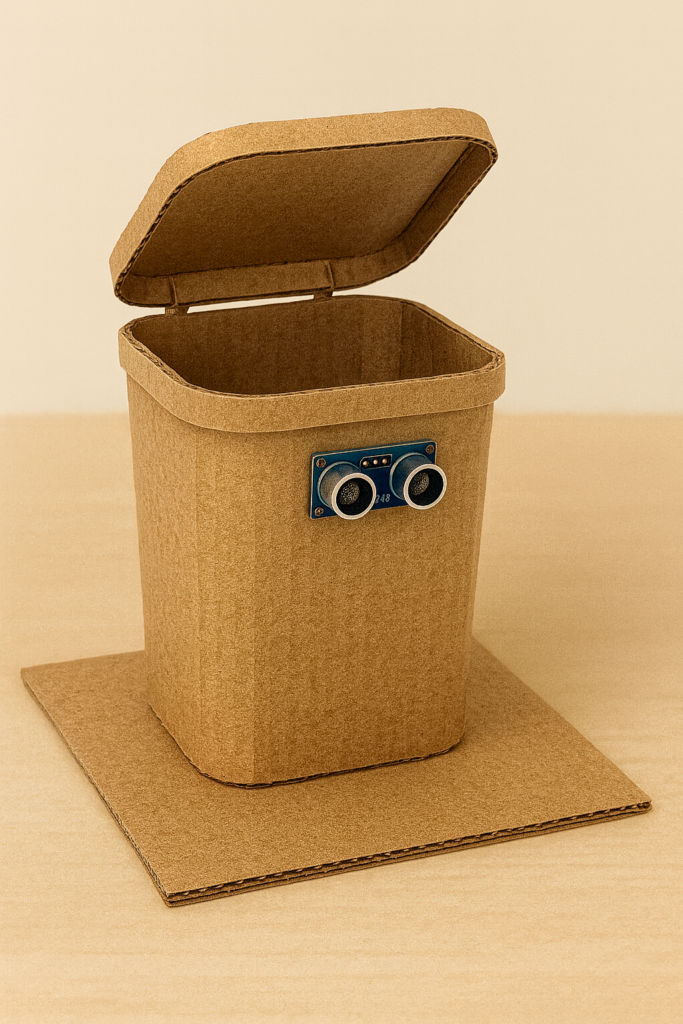
Tired of touching the dustbin lid again and again? A smart dustbin solves that problem in a fun way. Using Arduino, an ultrasonic sensor, and a small servo motor, you can make a dustbin that automatically opens its lid when your hand comes close and closes it after a short delay. It’s a great mini‑project for electronics students and a very practical gadget for your desk or room.
What Is a Smart Arduino Dustbin?
A smart dustbin is just a normal bin with an automatic lid. Instead of lifting the lid by hand, an ultrasonic sensor detects when something (like your hand) comes close, and an Arduino controls a servo motor to open and close the lid. Because the whole system is controlled by Arduino Nano and simple sensors, it is easy to customize and expand later (for example, adding a display or buzzer).
In this version, everything is mounted on a small cardboard box, but the same circuit can be used on a full‑size dustbin by using a stronger servo and better mechanical linkage.
Required Components
- Arduino Nano (or Uno)
- HC‑SR04 ultrasonic distance sensor
- Micro servo motor (SG90 type for small cardboard lid)
- Dustbin or small cardboard box for the body and lid
- Breadboard and jumper wires
- USB cable and power bank / 5 V adapter
- Hot glue or double‑sided tape for mounting
If you want to use a heavy plastic dustbin, consider a metal‑gear servo and a separate 5 V power supply, because the small micro servo may not have enough torque.
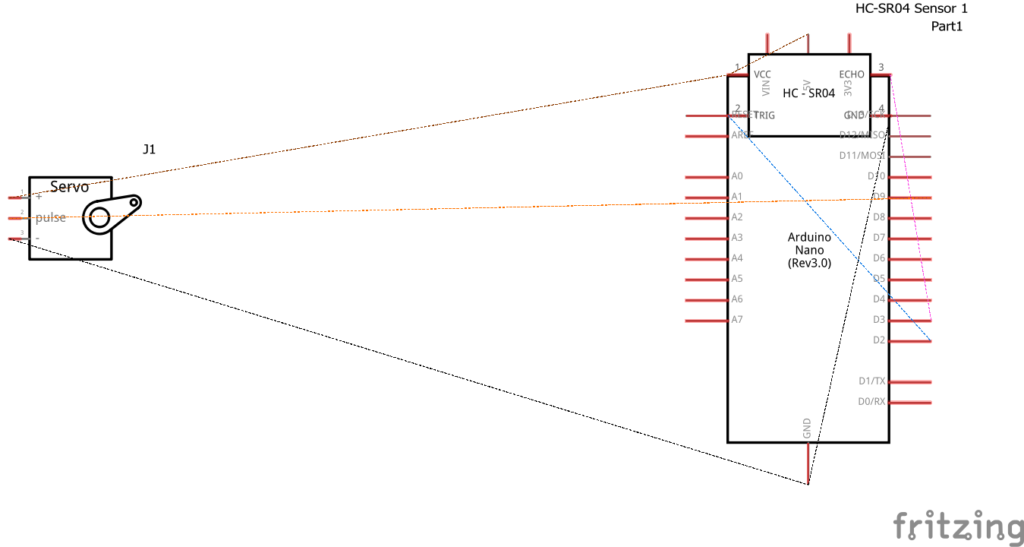
Circuit Diagram and Connections
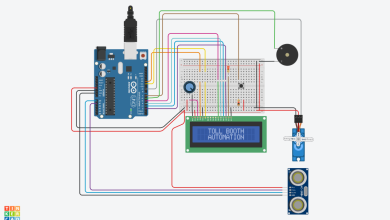
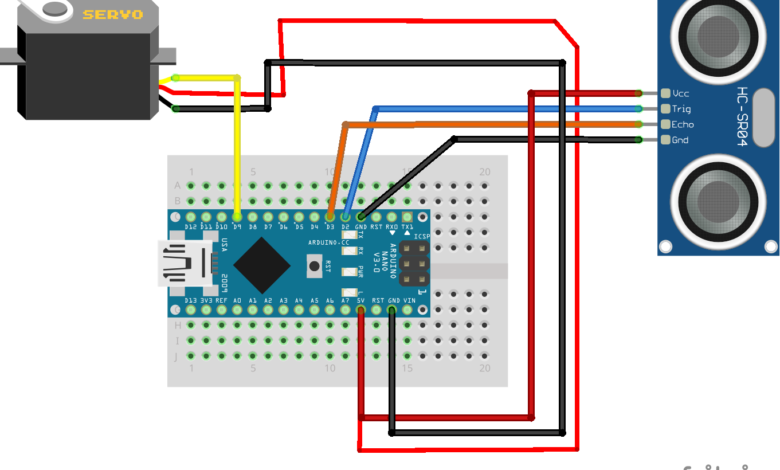
The circuit is very straightforward. Everything runs from the Arduino’s 5 V and GND when using a lightweight lid.
Ultrasonic sensor (HC‑SR04)
- VCC → 5 V on Arduino Nano
- GND → GND on Arduino Nano
- TRIG → digital pin D2
- ECHO → digital pin D3
Micro servo
- Red (VCC) → 5 V on Arduino Nano
- Brown/Black (GND) → GND on Arduino Nano
- Orange/Yellow (signal) → digital pin D9
Try to keep the servo wires short and use a solid 5 V source. If the Arduino resets when the servo moves, power the servo from a separate 5 V supply with a common ground.
Arduino Code
#include
Servo lidServo;
const int trigPin = 2;
const int echoPin = 3;
const int servoPin = 9;
long duration;
int distance; // distance in cm
// Adjust these as needed
const int openAngle = 150;
const int closeAngle = 0;
const int openRangeCm = 10; // open when object is closer than this
const int holdTimeMs = 3000; // lid remains open for 3 seconds
void setup() {
lidServo.attach(servoPin);
lidServo.write(closeAngle); // keep lid closed at start
pinMode(trigPin, OUTPUT);
pinMode(echoPin, INPUT);
}
int readDistanceCm() {
digitalWrite(trigPin, LOW);
delayMicroseconds(5);
digitalWrite(trigPin, HIGH);
delayMicroseconds(10);
digitalWrite(trigPin, LOW);
duration = pulseIn(echoPin, HIGH, 30000); // timeout ~30 ms
if (duration == 0) {
return 999; // no echo
}
int cm = duration / 58; // approximate conversion
return cm;
}
void loop() {
distance = readDistanceCm();
if (distance < openRangeCm) {
// Open lid
lidServo.write(openAngle);
delay(holdTimeMs);
// Close lid
lidServo.write(closeAngle);
delay(500);
}
delay(100); // small delay between measurements
}
You can fine‑tune three important values:
openRangeCm– how close your hand must be before the lid opens.openAngle/closeAngle– servo angles to match your lid’s mechanics.holdTimeMs– how long the lid stays open.
Mechanical Setup
- Fix the Arduino, breadboard, and wiring inside or at the back of the dustbin/cardboard box using hot glue or tape.
- Mount the ultrasonic sensor on the front side, pointing outwards, at a height where it can easily see your hand.
- Attach the servo near the lid hinge. Connect the servo horn to the lid using cardboard, plastic, or a small bracket, so rotating the servo opens and closes the lid smoothly.
- Make sure the lid can move freely and does not jam. Manually move the servo to test the full range before powering it.
How to Use the Smart Dustbin
- Power the Arduino through the USB cable and a power bank or 5 V adapter.
- Move your hand in front of the ultrasonic sensor, within about 5–10 cm.
- The lid should open automatically, wait for a few seconds, and then close again.
- When you are not using the dustbin, unplug the power to save energy.
This simple smart dustbin project teaches you how to use an ultrasonic sensor, servo motor, and Arduino together. You can extend it further with features like an OLED screen showing “OPEN/CLOSE,” a buzzer for feedback, or even an IoT counter to track how often the dustbin is used.