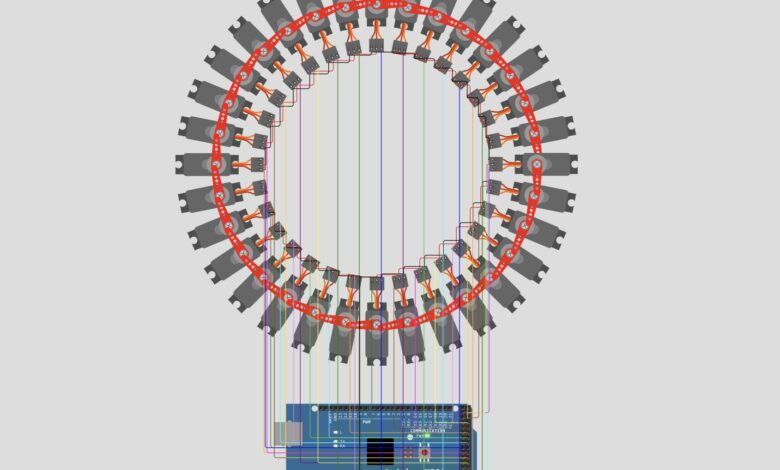
What happens when you connect 32 servo motors to an Arduino Mega and program them with creative animation sequences? You get one of the most visually stunning Arduino projects ever! In this project, 32 servo motors are arranged in a circle and programmed to perform 4 unique animation sequences — random chaos, synchronised sweeping, a rotating wave, and a compass pointer. It is mesmerizing to watch and a great way to explore the full power of the Arduino Mega!
What You Will Learn :
- How to control multiple servo motors using an array
- How to use Arduino Mega’s extra pins (22 to 53) for servo control
- How to create animation sequences with loops
- How to implement wave and compass patterns with servo motors
Components Required :
| Component | Quantity |
|---|---|
| Arduino Mega | 1 |
| Servo Motors (SG90 or similar) | 32 |
| 5V External Power Supply | 1 |
| Jumper Wires | Several |
| USB Cable | 1 |
| Computer with Arduino IDE | 1 |
Libraries Required :
Only one library is needed for this project:
- Servo — built into Arduino IDE, no installation required!
Circuit Diagram :
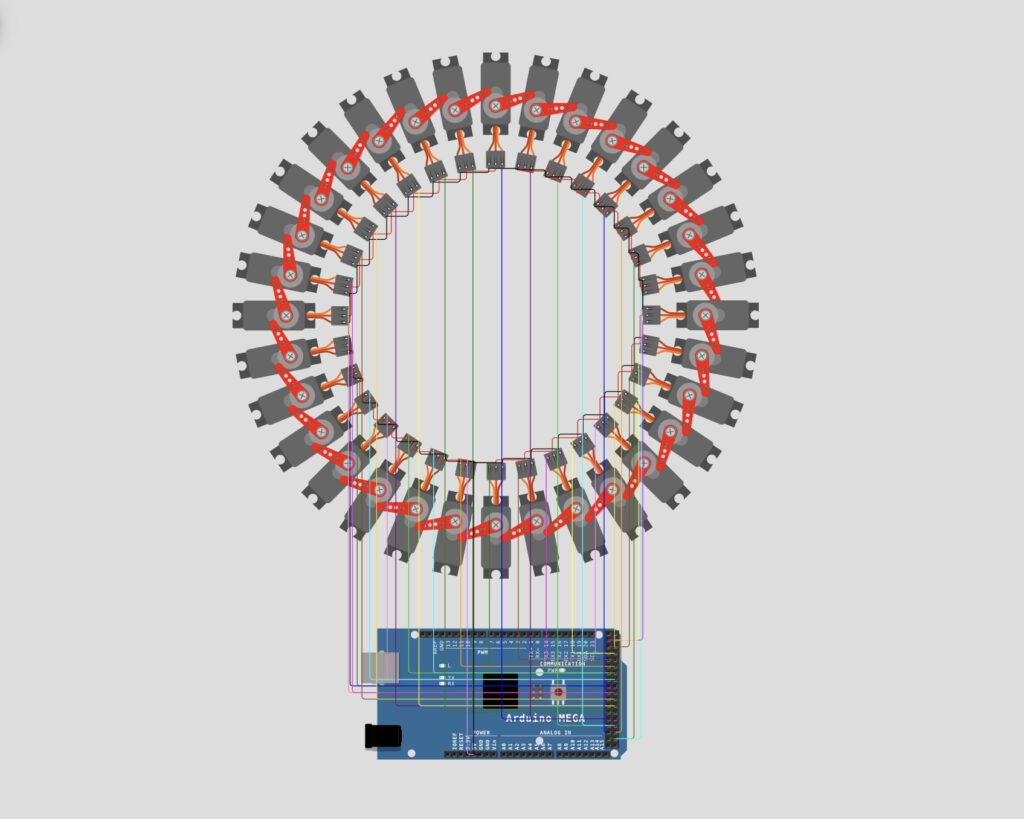
Wiring Table :
| Component | Connection |
|---|---|
| Servo Signal Pins | Arduino Mega Pin 22 to Pin 53 |
| Servo VCC (Red) | 5V External Power Supply |
| Servo GND (Black) | GND |
Important Note: 32 servo motors draw a significant amount of current. Always use a separate 5V external power supply for the servos. Powering all 32 servos directly from the Arduino’s 5V pin can damage your board!
How It Works :
The project cycles through 4 animation sequences continuously:
Sequence 1 — Random Chaos :
Each servo is set to a random angle between 0 and 180 degrees, creating a chaotic random movement across all 32 servos. Repeats 15 times.
Sequence 2 — Synchronised Sweep :
All 32 servos move together from 0 to 180 degrees and back, creating a perfectly synchronized sweeping motion. Repeats 3 times.
Sequence 3 — Rotating Wave :
A wave pattern travels around the circle of servos. Each servo’s angle is calculated based on its distance from the active servo, creating a smooth ripple effect. Repeats 6 times.
Sequence 4 — Compass:
Two adjacent servos form a pointer and two opposite servos form a tail, simulating a compass needle. The pointer moves left and right in a realistic compass wobble pattern before settling.
Circuit Simulation :
Watch all 32 servo motors perform the 4 animation sequences in action!
Arduino Code :
#include <Servo.h>


#define NUM_SERVOS 32
Servo myServo[NUM_SERVOS];


void setup()
{
  for( int i=0; i<NUM_SERVOS; i++)
  {
    myServo[i].attach( i + 22);
  }
}


void loop()
{
  // Sequence one - Random angles
  for( int a=0; a<15; a++)
  {
    for( int i=0; i<NUM_SERVOS; i++)
    {
      myServo[i].write( random( 0, 181));
      delay( 2);
    }
    delay( 150);
  }


  // Sequence two - All servos same angle
  for( int i=0; i<NUM_SERVOS; i++)
  {
    myServo[i].write( 0);
  }
  delay( 1000);


  for( int a=0; a<3; a++)
  {
    for( int r=0; r<=180; r++)
    {
      for( int i=0; i<NUM_SERVOS; i++)
      {
        myServo[i].write( r);
      }
      delay( 6);
    }
    for( int r=180; r>=0; r--)
    {
      for( int i=0; i<NUM_SERVOS; i++)
      {
        myServo[i].write( r);
      }
      delay( 6);
    }
  }


  // Sequence three - Rotating wave
  for( int a=0; a<6; a++)
  {
    for( int i=0; i<NUM_SERVOS; i++)
    {
      for( int j=0; j<NUM_SERVOS; j++)
      {
        int d = j - i;
        if( d < 0)
          d = -d;
        if( d > (NUM_SERVOS / 2))
          d = NUM_SERVOS - d;


        int angle = 90 - (10 * d);
        if( angle < 0)
          angle = 0;
        myServo[j].write( angle);
      }
      delay(40);
    }
  }


  // Sequence four - Compass
  int pointer = NUM_SERVOS * 3 / 4;
  showPointer( pointer);
  delay( 1000);


  for( int i=0; i<5; i++)
  {
    showPointer( --pointer);
    delay( 150);
  }
  delay( 200);
  for( int i=0; i<9; i++)
  {
    showPointer( ++pointer);
    delay( 150);
  }
  delay( 200);
  for( int i=0; i<5; i++)
  {
    showPointer( --pointer);
    delay( 150);
  }
  delay( 200);
  for( int i=0; i<4; i++)
  {
    showPointer( ++pointer);
    delay( 150);
  }
  delay( 160);
  for( int i=0; i<2; i++)
  {
    showPointer( --pointer);
    delay( 150);
  }
  delay( 80);
  for( int i=0; i<1; i++)
  {
    showPointer( ++pointer);
    delay( 150);
  }


  delay( 2000);
}


void showPointer( int s)
{
  int pointerA = s % NUM_SERVOS;
  int pointerB = (s + 1) % NUM_SERVOS;
  int tailA = (s + 16) % NUM_SERVOS;
  int tailB = (s + 17) % NUM_SERVOS;


  myServo[pointerA].write(180-56);
  myServo[pointerB].write(56);


  myServo[tailA].write(95);
  myServo[tailB].write(85);


  int n = (NUM_SERVOS / 2) - 2;
  int start = pointerB + 1;
  for( int i=0; i<n; i++)
  {
    int j = (start + i) % NUM_SERVOS;
    myServo[j].write( 2);
  }


  start = tailB + 1;
  for( int i=0; i<n; i++)
  {
    int j = (start + i) % NUM_SERVOS;
    myServo[j].write( 178);
  }
}
Code Explanation :
Setup: Attaches all 32 servo motors to Arduino Mega pins 22 through 53 using a for loop.
Sequence 1 (Random): Uses random(0, 181) to set each servo to a random angle. The outer loop repeats this 15 times with a 150ms delay between each round.
Sequence 2 (Synchronised Sweep): First sets all servos to 0 degrees, then sweeps all of them together from 0 to 180 and back 3 times using nested for loops.
Sequence 3 (Wave): For each active servo position, calculates the distance of every other servo from the active one and sets their angles based on that distance, creating a smooth ripple wave that travels around the circle.
Sequence 4 (Compass): Uses the showPointer() function to simulate a compass needle. Two servos form the pointer and two opposite servos form the tail. The pointer wobbles realistically before settling on a position.
showPointer() Function: Calculates which servos form the pointer and tail based on position, then sets the remaining servos to near-flat positions on either side to enhance the compass look.
How to Use :
- Arrange 32 servo motors in a circular pattern as shown in the diagram
- Connect all servo signal wires to Arduino Mega pins 22 through 53
- Connect all servo VCC wires to an external 5V power supply
- Connect all GND wires together including Arduino GND
- Upload the code to your Arduino Mega
- Watch the 4 animation sequences play automatically!
Customisation Tips :
- Change number of servos: Modify NUM_SERVOS to use fewer servos (must match your wiring)
- Change animation speed: Adjust the delay() values in each sequence
- Add more sequences: Add new cases after Sequence 4 for more animation patterns
- Change wave intensity: Modify angle = 90 – (10 * d) for a wider or narrower wave
- Change compass wobble: Adjust the loop counts and delays in Sequence 4
You have successfully built a stunning 32 Servo Motor Circular Animation using Arduino Mega! This project pushes the limits of what Arduino can do and creates a truly eye-catching display. The 4 animation sequences showcase different ways to control multiple servos in creative patterns.
This project is perfect for art installations, robotics demos, or just impressing everyone around you. Keep experimenting with new animation patterns and visit Tinkercircuits.com for more exciting projects!
Happy Tinkering! — The Tinker Circuits Team