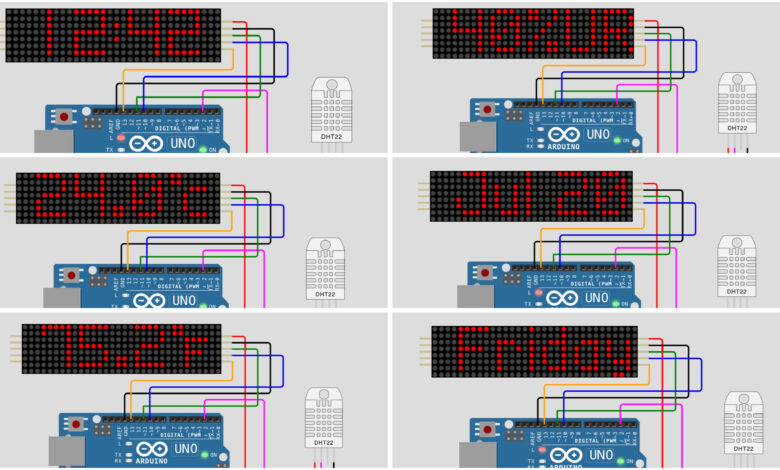
What if your LED matrix display could show the time, date, day of the week, temperature, and humidity all in one? In this project, we build a Smart LED Matrix Display using an Arduino Uno, a MAX7219 LED matrix, a DS1307 RTC module, and a DHT22 sensor. The display cycles through all this information automatically with smooth scrolling effects!
What You Will Learn :
- How to use a MAX7219 LED matrix with MD_Parola library
- How to read real time clock data from a DS1307 RTC module
- How to read temperature and humidity from a DHT22 sensor
- How to display multiple information on an LED matrix with scroll effects
Components Required :
| Component | Quantity |
|---|---|
| Arduino Uno | 1 |
| MAX7219 LED Dot Matrix Display (4 modules) | 1 |
| DS1307 RTC Module | 1 |
| DHT22 Temperature & Humidity Sensor | 1 |
| Jumper Wires | Several |
| USB Cable | 1 |
| Computer with Arduino IDE | 1 |
Libraries Required :
You will need to install the following libraries in your Arduino IDE:
- MD_Parola — for LED matrix text effects
- MD_MAX72xx — installed along with MD_Parola
- DHT sensor library — for reading temperature and humidity
- SPI.h — built-in
- Wire.h — built-in
To install: Go to Sketch → Include Library → Manage Libraries and search for MD_Parola and DHT sensor library.
Circuit Diagram :
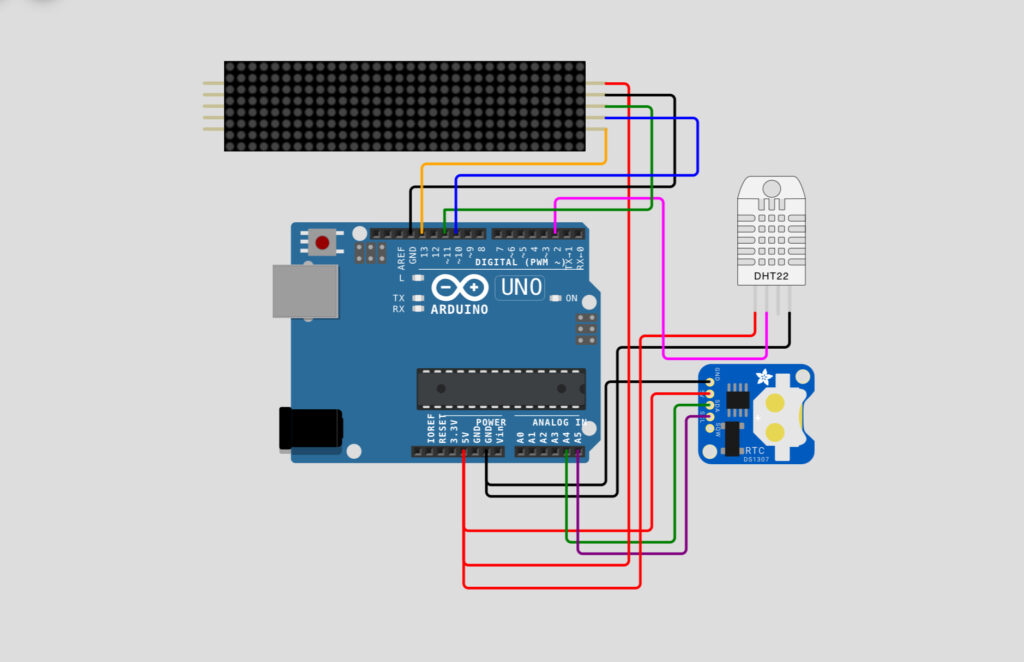
Wiring Table :
MAX7219 LED Matrix → Arduino Uno
| LED Matrix Pin | Arduino Pin | Wire Color |
|---|---|---|
| VCC | 5V | Red |
| GND | GND | Black |
| DIN | Pin 11 | Green |
| CS | Pin 10 | Blue |
| CLK | Pin 13 | Orange |
DHT22 Sensor → Arduino Uno
| DHT22 Pin | Arduino Pin | Wire Color |
|---|---|---|
| VCC | 5V | Red |
| GND | GND | Black |
| DATA | Pin 2 | Pink |
DS1307 RTC Module → Arduino Uno
| DS1307 Pin | Arduino Pin | Wire Color |
|---|---|---|
| VCC | 5V | Red |
| GND | GND | Black |
| SDA | A4 | Green |
| SCL | A5 | Purple |
How It Works :
The display cycles through 5 information modes automatically:
| Mode | Display | Effect |
|---|---|---|
| 0 | Temperature in Celsius | Scroll Left |
| 1 | Temperature in Fahrenheit | Scroll Up |
| 2 | Humidity % | Scroll Down |
| 3 | Live Clock (HH:MM) | 7 Segment Font |
| 4 | Day of Week | Scroll Left |
| Default | Date (DD MMM YYYY) | Scroll Left |
The DS1307 RTC module keeps accurate time even when the Arduino is powered off. The DHT22 sensor reads temperature and humidity every 1 second.
Circuit Simulation :
Watch the LED matrix cycle through time, date, temperature, and humidity with smooth scroll effects!
Arduino Code :
#include <MD_Parola.h>
#include <MD_MAX72xx.h>
#include <DHT.h>
#include <SPI.h>
#include <Wire.h>
#include "Font7Seg.h"


#define HARDWARE_TYPE MD_MAX72XX::PAROLA_HW
#define MAX_DEVICES 4
#define CLK_PIN     13
#define DATA_PIN    11
#define CS_PIN      10
#define SPEED_TIME  75
#define PAUSE_TIME  0
#define MAX_MESG    20


#define DS1307_ADDRESS 0x68


#define DHTPIN 2
#define DHTTYPE DHT22
#define TIMEDHT 1000


uint8_t wday, mday, month, year;
uint8_t hours, minutes, seconds;


char szTime[9];
char szMesg[MAX_MESG + 1] = "";


float humidity, celsius, fahrenheit;


uint8_t degC[] = { 6, 3, 3, 56, 68, 68, 68 };
uint8_t degF[] = { 6, 3, 3, 124, 20, 20, 4 };


uint8_t clear = 0x00;


uint32_t timerDHT = TIMEDHT;


DHT dht(DHTPIN, DHTTYPE);


MD_Parola P = MD_Parola(HARDWARE_TYPE, CS_PIN, MAX_DEVICES);


void beginDS1307()
{
  Wire.beginTransmission(DS1307_ADDRESS);
  Wire.write(clear);
  Wire.endTransmission();


  Wire.requestFrom(DS1307_ADDRESS, 0x07);


  seconds = bcdToDec(Wire.read());
  minutes = bcdToDec(Wire.read());
  hours   = bcdToDec(Wire.read() & 0xff);
  wday    = bcdToDec(Wire.read());
  mday    = bcdToDec(Wire.read());
  month   = bcdToDec(Wire.read());
  year    = bcdToDec(Wire.read());
}


uint8_t decToBcd(uint8_t value)
{
  return ((value / 10 * 16) + (value % 10));
}


uint8_t bcdToDec(uint8_t value)
{
  return ((value / 16 * 10) + (value % 16));
}


void getTime(char *psz, bool f = true)
{
  sprintf(psz, "%02d%c%02d", hours, (f ? ':' : ' '), minutes);
}


void getDate(char *psz)
{
  char szBuf[10];
  sprintf(psz, "%d %s %04d", mday, mon2str(month, szBuf, sizeof(szBuf) - 1), (year + 2000));
}


void getTemperature()
{
  if ((millis() - timerDHT) > TIMEDHT) {
    timerDHT = millis();
    humidity = dht.readHumidity();
    celsius = dht.readTemperature();
    fahrenheit = dht.readTemperature(true);


    if (isnan(humidity) || isnan(celsius) || isnan(fahrenheit)) {
      Serial.println("Failed to read from DHT sensor!");
      return;
    }
  }
}


char *mon2str(uint8_t mon, char *psz, uint8_t len)
{
  static const __FlashStringHelper* str[] =
  {
    F("Jan"), F("Feb"), F("Mar"), F("Apr"),
    F("May"), F("Jun"), F("Jul"), F("Aug"),
    F("Sep"), F("Oct"), F("Nov"), F("Dec")
  };


  strncpy_P(psz, (const char PROGMEM *)str[mon - 1], len);
  psz[len] = '\0';
  return (psz);
}


char *dow2str(uint8_t code, char *psz, uint8_t len)
{
  static const __FlashStringHelper* str[] =
  {
    F("Sunday"), F("Monday"), F("Tuesday"),
    F("Wednesday"), F("Thursday"), F("Friday"),
    F("Saturday")
  };


  strncpy_P(psz, (const char PROGMEM *)str[code - 1], len);
  psz[len] = '\0';
  return (psz);
}


void setup(void)
{
  Wire.begin();


  P.begin(2);
  P.setInvert(false);


  P.setZone(0, MAX_DEVICES - 4, MAX_DEVICES - 1);
  P.setZone(1, MAX_DEVICES - 4, MAX_DEVICES - 1);


  P.displayZoneText(1, szTime, PA_CENTER, SPEED_TIME, PAUSE_TIME, PA_PRINT, PA_NO_EFFECT);
  P.displayZoneText(0, szMesg, PA_CENTER, SPEED_TIME, 0, PA_PRINT, PA_NO_EFFECT);


  P.addChar('$', degC);
  P.addChar('&', degF);


  dht.begin();
}


void loop(void)
{
  static uint32_t lastTime = 0;
  static uint8_t  display = 0;
  static bool flasher = false;


  beginDS1307();
  getTemperature();


  P.displayAnimate();


  if (P.getZoneStatus(0))
  {
    switch (display)
    {
      case 0:
        P.setPause(0, 1000);
        P.setTextEffect(0, PA_SCROLL_LEFT, PA_SCROLL_UP);
        display++;
        dtostrf(celsius, 3, 1, szMesg);
        strcat(szMesg, "$");
        break;


      case 1:
        P.setTextEffect(0, PA_SCROLL_UP, PA_SCROLL_DOWN);
        display++;
        dtostrf(fahrenheit, 3, 1, szMesg);
        strcat(szMesg, "&");
        break;


      case 2:
        P.setTextEffect(0, PA_SCROLL_DOWN, PA_SCROLL_LEFT);
        display++;
        dtostrf(humidity, 3, 0, szMesg);
        strcat(szMesg, "%UR");
        break;


      case 3:
        P.setFont(0, numeric7Seg);
        P.setTextEffect(0, PA_PRINT, PA_NO_EFFECT);
        P.setPause(0, 0);


        if ((millis() - lastTime) >= 1000)
        {
          lastTime = millis();
          getTime(szMesg, flasher);
          flasher = !flasher;
        }


        if ((seconds == 00) && (seconds <= 30)) {
          display++;
          P.setTextEffect(0, PA_PRINT, PA_WIPE_CURSOR);
        }
        break;


      case 4:
        P.setFont(0, nullptr);
        P.setTextEffect(0, PA_SCROLL_LEFT, PA_SCROLL_LEFT);
        display++;
        dow2str(wday, szMesg, MAX_MESG);
        break;


      default:
        P.setTextEffect(0, PA_SCROLL_LEFT, PA_SCROLL_LEFT);
        display = 0;
        getDate(szMesg);
        break;
    }


    P.displayReset(0);
  }
}
Code Explanation :
Pin Definitions: Pins are defined for the MAX7219 LED matrix (CLK, DATA, CS), DHT22 sensor (Pin 2), and DS1307 RTC (I2C via A4/A5).
beginDS1307(): Reads time and date from the DS1307 RTC module over I2C and converts BCD values to decimal.
getTemperature(): Reads humidity, temperature in Celsius and Fahrenheit from the DHT22 sensor every 1 second.
getTime() & getDate(): Format the time as HH:MM and date as DD MMM YYYY for display.
mon2str() & dow2str(): Convert month and day numbers to their text names stored in Flash memory.
Setup: Initialises I2C, LED matrix zones, custom degree symbols, and DHT22 sensor.
Loop: Reads RTC and DHT22 data, then cycles through 5 display modes using a switch statement with different scroll effects for each mode.
How to Use :
- Wire the circuit as shown in the diagram above
- Install MD_Parola and DHT sensor library in Arduino IDE
- Copy and upload the code to your Arduino Uno
- Watch the LED matrix cycle through temperature, humidity, clock, day, and date automatically!
Customisation Tips :
- Change display speed: Modify SPEED_TIME value, lower = faster scrolling
- Change update interval: Modify TIMEDHT for faster or slower sensor updates
- Add more modules: Change MAX_DEVICES to match your LED matrix chain length
- Change display order: Rearrange the switch cases to change the display sequence
- Add more data: Use extra sensors and add more switch cases to display additional information
You have successfully built a Smart LED Matrix Display that shows time, date, day of week, temperature, and humidity all in one! This is a fantastic project that combines an RTC module, a temperature sensor, and an LED matrix display into one useful and impressive device.
It can be used as a desk display, a weather station, or even a lobby information board. Keep experimenting and visit Tinkercircuits.com for more exciting projects!
Happy Tinkering! — The Tinker Circuits Team