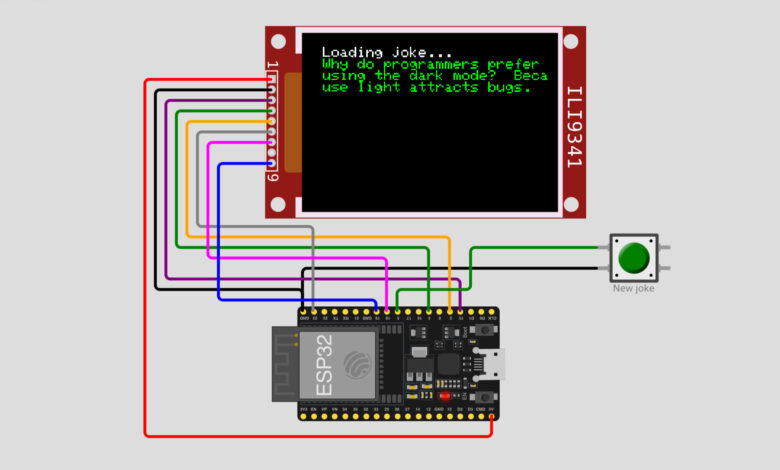
What if your microcontroller could tell you jokes? In this fun project, we build a WiFi Joke Machine using an ESP32 and an ILI9341 TFT display. The ESP32 connects to WiFi, fetches a fresh programming joke from the internet using a public API, and displays it on the colorful TFT screen. Press the button and get a brand new joke every time!
What You Will Learn :
- How to connect an ILI9341 TFT display to ESP32
- How to connect ESP32 to WiFi and make HTTP requests
- How to parse JSON data using ArduinoJson
- How to display fetched data on a TFT screen
Components Required :
| Component | Quantity |
|---|---|
| ESP32 Development Board | 1 |
| ILI9341 TFT Display (2.8”) | 1 |
| Push Button | 1 |
| Jumper Wires | Several |
| USB Cable | 1 |
| Computer with Arduino IDE | 1 |
Libraries Required :
You will need to install the following libraries in your Arduino IDE:
- Adafruit ILI9341 — for the TFT display
- Adafruit GFX Library — installed along with Adafruit ILI9341
- ArduinoJson — for parsing JSON data from the API
- WiFi.h — built-in with ESP32 board package
- HTTPClient.h — built-in with ESP32 board package
To install: Go to Sketch → Include Library → Manage Libraries and search for Adafruit ILI9341 and ArduinoJson.
Circuit Diagram :
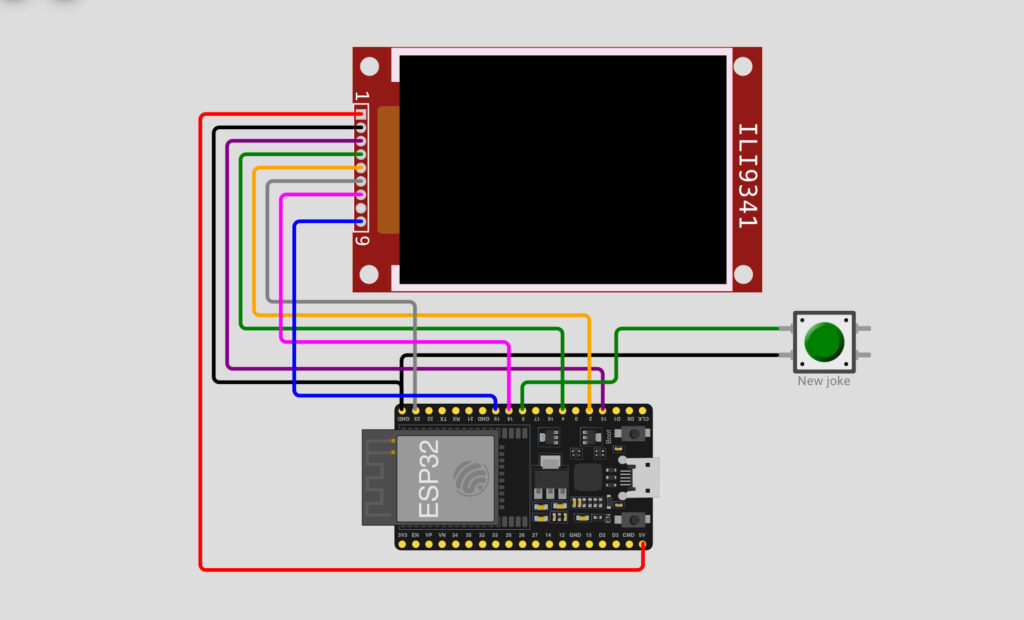
Wiring Table :
ILI9341 TFT Display → ESP32
| ILI9341 Pin | ESP32 Pin | Wire Color |
|---|---|---|
| VCC | 5V | Red |
| GND | GND | Black |
| CS | Pin 15 | Orange |
| RESET | Pin 4 | Yellow |
| DC | Pin 2 | Purple |
| MOSI | Pin 23 | Green |
| SCK | Pin 18 | Blue |
| LED | 3V3 | Gray |
| MISO | Pin 19 | Pink |
Push Button → ESP32
| Button Pin | ESP32 Pin |
|---|---|
| One pin | Pin 5 |
| Other pin | GND |
How It Works :
- The ESP32 connects to WiFi on startup and displays the connection progress on the TFT screen
- Once connected, it automatically fetches the first programming joke from the JokeAPI
- The joke is displayed in green text on the black TFT screen
- Press the New Joke button to clear the screen and fetch a brand new joke
- The API returns two types of jokes: single line jokes and two-part setup/delivery jokes, both are handled by the code
Circuit Simulation :
Watch the ESP32 connect to WiFi, fetch a joke from the internet, and display it on the TFT screen!
Arduino Code :
#include <WiFi.h>
#include <HTTPClient.h>
#include <ArduinoJson.h>
#include <Adafruit_GFX.h>
#include <Adafruit_ILI9341.h>


const char* ssid = "Tinkercircuits";
const char* password = "";


#define BTN_PIN 5
#define TFT_DC  2
#define TFT_CS  15
Adafruit_ILI9341 tft = Adafruit_ILI9341(TFT_CS, TFT_DC);


const String url = "https://v2.jokeapi.dev/joke/Programming";


String getJoke() {
  HTTPClient http;
  http.useHTTP10(true);
  http.begin(url);
  http.GET();
  String result = http.getString();


  DynamicJsonDocument doc(2048);
  DeserializationError error = deserializeJson(doc, result);


  if (error) {
    Serial.print("deserializeJson() failed: ");
    Serial.println(error.c_str());
    return "<error>";
  }


  String type = doc["type"].as<String>();
  String joke = doc["joke"].as<String>();
  String setup = doc["setup"].as<String>();
  String delivery = doc["delivery"].as<String>();
  http.end();
  return type.equals("single") ? joke : setup + "  " + delivery;
}


void nextJoke() {
  tft.setTextColor(ILI9341_WHITE);
  tft.println("\nLoading joke...");


  String joke = getJoke();
  tft.setTextColor(ILI9341_GREEN);
  tft.println(joke);
}


void setup() {
  pinMode(BTN_PIN, INPUT_PULLUP);


  WiFi.begin(ssid, password, 6);


  tft.begin();
  tft.setRotation(1);


  tft.setTextColor(ILI9341_WHITE);
  tft.setTextSize(2);
  tft.print("Connecting to WiFi");


  while (WiFi.status() != WL_CONNECTED) {
    delay(100);
    tft.print(".");
  }


  tft.print("\nOK! IP=");
  tft.println(WiFi.localIP());


  nextJoke();
}


void loop() {
  if (digitalRead(BTN_PIN) == LOW) {
    tft.fillScreen(ILI9341_BLACK);
    tft.setCursor(0, 0);
    nextJoke();
  }


  delay(100);
}
Code Explanation :
WiFi Setup: The ESP32 connects to WiFi using the provided SSID and password. Connection progress is shown on the TFT screen with dots until connected.
getJoke() Function: Makes an HTTP GET request to the JokeAPI, receives the JSON response, and parses it using ArduinoJson. It handles both single-line jokes and two-part setup/delivery jokes.
nextJoke() Function: Displays “Loading joke…” in white text, then calls getJoke() and displays the result in green text on the TFT screen.
Setup: Initialises the button pin, connects to WiFi, sets up the TFT display, and loads the first joke automatically.
Loop: Continuously checks if the button is pressed. When pressed, it clears the screen and fetches a new joke.
How to Use :
- Wire the circuit as shown in the diagram above
- Install Adafruit ILI9341 and ArduinoJson libraries in Arduino IDE
- Update the WiFi credentials in the code with your network name and password
- Upload the code to your ESP32
- Watch the TFT display connect to WiFi and show the first joke
- Press the New Joke button to get a fresh joke anytime!
Customisation Tips :
- Change joke category: Replace “Programming” in the URL with “Misc”, “Dark”, “Pun”, or “Spooky” for different joke types
- Change text color: Replace ILI9341_GREEN with ILI9341_YELLOW, ILI9341_CYAN, or ILI9341_RED
- Change text size: Modify tft.setTextSize(2) to make text bigger or smaller
- Auto fetch jokes: Add a timer in the loop to automatically fetch a new joke every few minutes
- Add joke counter: Display how many jokes have been shown on the screen
You have successfully built a WiFi Joke Machine using ESP32 and an ILI9341 TFT display! This project is a great introduction to working with WiFi, HTTP requests, JSON parsing, and TFT displays all in one fun build. The JokeAPI is free to use and has hundreds of jokes across many categories.
Take it further by adding more joke categories, a score counter, or even a touchscreen to switch categories. Share your favourite joke it generated with us at Tinkercircuits.com!
Happy Tinkering! — The Tinker Circuits Team