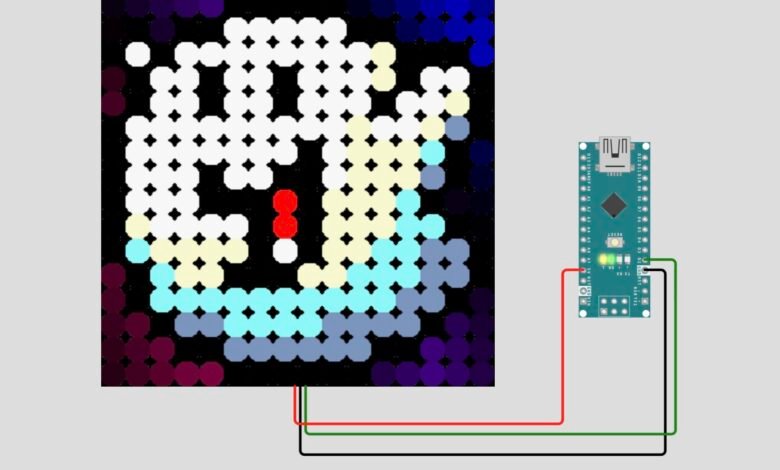
We have always liked retro pixel art, so I built a small display that plays 41 pixel-art animations on a 16×16 LED matrix, drawn over a flowing rainbow. It runs on an Arduino Nano and needs only three wires. In this post we will walk you through every step, so you can build the same thing even if it’s your first LED project.
What You Will Build :
A 16×16 WS2812B LED matrix that :
- plays 41 pixel-art animations (retro game characters, a spinning gear, flames and more)
- shows them over a smooth, moving rainbow background
- changes to a new animation about every 2.5 seconds
- lets you change brightness, colours and effects live from your computer
What You Will Learn :
- How to wire and power a WS2812B LED matrix
- How to install a library and upload a multi-file sketch in the Arduino IDE
- How heatshrink compression fits 41 animations into the Nano’s tiny memory
- How to control the display over Serial
- How to fix the most common problems (scrambled rows, wrong colours, no upload)
Components Required :
| Component | Quantity | Notes |
|---|---|---|
| Arduino Nano (ATmega328P) | 1 | Original or clone, 5 V / 16 MHz |
| 16×16 WS2812B LED matrix (256 LEDs) | 1 | Must have a DIN, 5V and GND connection |
| Jumper wires | 3 | Red, black and green help you keep track |
| USB cable for your Nano | 1 | Mini-USB or the type your Nano uses |
| External 5V power supply | 1 | Recommended. 5V 4A is a good start for medium brightness |
| 330 Ω resistor (optional) | 1 | In series with the data wire |
| 1000 µF capacitor (optional) | 1 | Across the matrix’s 5V and GND |
You also need the Arduino IDE on your computer.
Circuit Diagram :
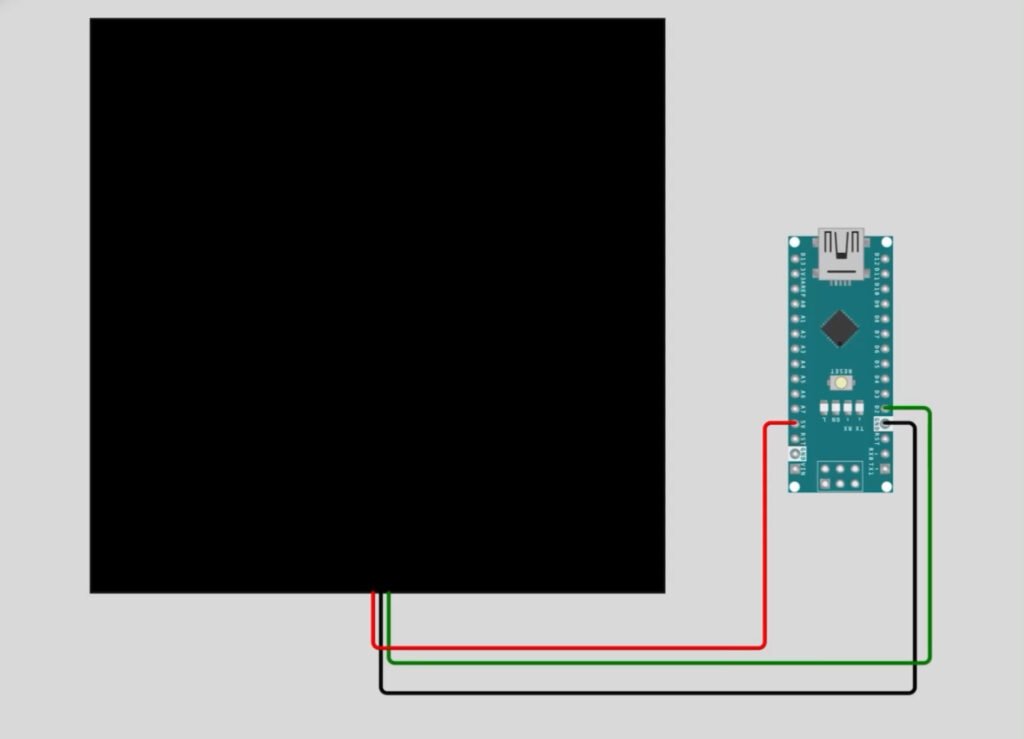
Wiring Table :
| Matrix Pin | Arduino Nano Pin | Wire Colour |
|---|---|---|
| DIN (data in) | D2 | Green |
| 5V | 5V | Red |
| GND | GND | Black |
Read these notes before you connect anything:
- Matrices have an input end (DIN) and an output end (DOUT). Connect to DIN. If nothing lights up, check that you didn’t use DOUT.
- The data pin is set by
LED_PINin the code. If you wire to a different pin, change that line. - If you power the matrix from an external 5V supply, connect that supply’s GND to the Nano’s GND as well. Without a shared ground the data signal won’t work reliably.
- Don’t power a bright, full matrix from the Nano’s 5V pin. See the Power Warning below.
How It Works :
Each of the 256 LEDs has its own tiny controller chip, so the Nano needs only one data wire to set the colour of every pixel. The sketch holds all 256 colours in memory and sends them to the matrix 50 times a second.
Two layers are drawn on every frame:
- Rainbow layer: a smooth, flowing rainbow that fills the whole matrix.
- Sprite layer: a 16×16 pixel-art animation, unpacked from a compressed copy stored in the Nano’s program memory.
Coloured sprite pixels are copied straight onto the matrix. The empty background pixels are faded, so the rainbow shows through behind the character. About every 2.5 seconds the display moves on to the next animation.
You pick what is shown with the ” e ” key in the Serial Monitor:
| Display Mode | What You See |
|---|---|
| Rainbow only | Just the flowing rainbow |
| Sprites only | Animations on their own, with soft fading |
| Sprites over rainbow (default) | Animations on top of the rainbow |
Power Warning :
A full 16×16 matrix can draw a lot of current. Each WS2812B LED can use up to about 60 mA at full-brightness white, so all 256 together could in theory pull over 15 A. Animations light only part of the matrix, so real use is far lower. Even so, it can be more than a USB port (about 500 mA) can supply.
The sketch starts at full brightness (BRIGHTNESS 255) with no power limit (MAX_MILLIWATTS 0). Before you power it up:
- Set
BRIGHTNESSto about 40 while testing from USB - Or set
MAX_MILLIWATTSto 2500 to stay within a USB port’s limit - For bright, long-running builds, use a separate 5V supply and share its ground with the Nano
- If the matrix flickers or the Nano keeps resetting, the supply is too weak. Lower the brightness
Step 1: Get the Files :
The project uses six files that must all sit in one folder:
| File | What It Does |
|---|---|
| scintillating_heatshrink.ino | Main sketch (the full code is below) |
| gifs.h | The 41 compressed sprite animations |
| heatshrink_config.h | Decoder settings (fixed memory, 256-byte window) |
| heatshrink_common.h | Library constants and version number |
| heatshrink_decoder.h | Decoder function declarations |
| heatshrink_decoder.ino | The decompression code |
- Create a folder called exactly
scintillating_heatshrink. The Arduino IDE needs the folder name to match the main sketch. - Save the sketch from the Arduino Code section below as
scintillating_heatshrink.inoinside it. - Download the other five files from the project’s GitHub page: https://github.com/sutaburosu/scintillating_heatshrink/. Click the green Code button, then Download ZIP, unzip it, and copy
gifs.h,heatshrink_config.h,heatshrink_common.h,heatshrink_decoder.handheatshrink_decoder.inointo yourscintillating_heatshrinkfolder. If you open a file on GitHub, you can also use the Raw button and save it from there. - Keep the licence notices inside the heatshrink files as they are.
Check: the folder should now contain six files with these exact names.
The compression library behind these files is heatshrink by Scott Vokes: https://github.com/atomicobject/heatshrink
We couldn’t open the GitHub page from here, so we haven’t confirmed which folder the five files sit in. Before you publish, open the link and check. If they are inside a subfolder, change step 3 to name it, for example “open the scintillating_heatshrink folder inside the ZIP”. If the repository’s .ino is named differently, rename your copy of the files to match what the page shows.
Step 2: Install the Arduino IDE and FastLED :
- Download and install the Arduino IDE from arduino.cc.
- Open it and go to Sketch → Include Library → Manage Libraries.
- Search for FastLED and click Install. Use a recent version, because the sketch uses a newer FastLED function for smoother colours.
Step 3: Open and Upload :
- Go to File → Open, and choose
scintillating_heatshrink.ino. The other five files open as extra tabs. - Find the line
#define BRIGHTNESS 255and change it to#define BRIGHTNESS 40for testing. - Plug the Nano into your computer with the USB cable.
- Set Tools → Board → Arduino Nano.
- Set Tools → Processor → ATmega328P. If the upload fails later, try ATmega328P (Old Bootloader), which many clone boards need.
- Select your board under Tools → Port.
- Click Upload and wait for “Done uploading”.
Step 4: Wire and Power Up :
- Disconnect the USB cable.
- Make the three connections from the Wiring Table.
- Reconnect power (and the external 5V supply, if you use one).
- The display fades in over about two-thirds of a second, then the animations start.
Circuit Simulation :
Arduino Code :
This is the main sketch we used. we tidied it by removing unused commented-out code and two unused helper functions, and the working logic is unchanged.
#include <Arduino.h>
#include <FastLED.h>
#include <stdint.h>
#include <avr/pgmspace.h>
#include "heatshrink_config.h"
#include "heatshrink_decoder.h"

enum XY_matrix_config { SERPENTINE = 1, ROWMAJOR = 2, FLIPMAJOR = 4, FLIPMINOR = 8 };

// MAX_MILLIWATTS can only be changed at compile-time. Use 0 to disable limit.
// Brightness can be changed at runtime via serial with 'b' and 'B'
#define MAX_MILLIWATTS 0
#define BRIGHTNESS 255
#define LED_PIN 2
#define COLOR_ORDER GRB
#define CHIPSET WS2812B
#define kMatrixWidth 16
#define kMatrixHeight 16
#define XY_MATRIX (ROWMAJOR)
#define NUM_LEDS ((kMatrixWidth) * (kMatrixHeight))

#define SERIAL_UI 1 // if 1, can be controlled via keypresses in PuTTY
#define FADEIN_FRAMES 32 // how long to reach full brightness when powered on
#define MS_GOAL 20 // to try maintain 1000 / 20ms == 50 frames per second

#define GIF2H_MAX_PALETTE_ENTRIES 140 // RAM is always tight on ATmega328...
#define GIF2H_NUM_PIXELS NUM_LEDS // all images must be the same size as the matrix

CRGB leds[NUM_LEDS];
CRGBPalette16 currentPalette;

uint16_t XY(uint8_t x, uint8_t y) {
uint8_t major, minor, sz_major, sz_minor;
if (x >= kMatrixWidth || y >= kMatrixHeight)
return NUM_LEDS;
if (XY_MATRIX & ROWMAJOR)
major = x, minor = y, sz_major = kMatrixWidth, sz_minor = kMatrixHeight;
else
major = y, minor = x, sz_major = kMatrixHeight, sz_minor = kMatrixWidth;
if (XY_MATRIX & FLIPMINOR)
minor = sz_minor - 1 - minor;
if ((XY_MATRIX & FLIPMAJOR) ^ (minor & 1 && (XY_MATRIX & SERPENTINE)))
major = sz_major - 1 - major;
return (uint16_t) minor * sz_major + major;
}

#if FASTLED_USE_PROGMEM == 1
#define FL_PGM_READ_PTR_NEAR(x) (pgm_read_ptr_near(x))
#else
#if !defined(FL_PGM_READ_PTR_NEAR)
#define FL_PGM_READ_PTR_NEAR(addr) ({typeof(addr) addr = (addr); (void const )(*addr); })
#endif
#if !defined(memcpy_P)
#define memcpy_P(dest, src, n) memcpy(dest, src, n)
#endif
#endif

// Blend one colour toward another by a given amount (linear, in RGB space).
// https://gist.github.com/kriegsman/d0a5ed3c8f38c64adcb4837dafb6e690
void nblendU8TowardU8(uint8_t& cur, const uint8_t target, uint8_t amount) {
if (cur == target) return;
if (cur < target) {
cur += scale8(target - cur, amount);
} else {
cur -= scale8(cur - target, amount);
}
}

CRGB fadeTowardColour(CRGB& cur, const CRGB& target, uint8_t amount) {
nblendU8TowardU8(cur.red, target.red, amount);
nblendU8TowardU8(cur.green, target.green, amount);
nblendU8TowardU8(cur.blue, target.blue, amount);
return cur;
}

typedef struct HSprite {
uint16_t datasize;
uint16_t frames;
uint16_t duration;
uint8_t flags;
uint8_t palette_entries;
CRGB palette[];
uint8_t hs_data[];
} HSprite;

#include "gifs.h"

FL_PROGMEM extern const HSprite *const hsprite_list[] = {
(HSprite*) &HSpr_35disk,
(HSprite*) &HSpr_load,
(HSprite*) &HSpr_vn,
(HSprite*) &HSpr_unionflag16,
(HSprite*) &HSpr_eu,
(HSprite*) &HSpr_ghost,
(HSprite*) &HSpr_scheisse,
(HSprite*) &HSpr_devil_nod,
(HSprite*) &HSpr_kputrummis,
(HSprite*) &HSpr_rjb,
(HSprite*) &HSpr_owl,
(HSprite*) &HSpr_twylogo,
(HSprite*) &HSpr_gear,
(HSprite*) &HSpr_16x16_oric,
(HSprite*) &HSpr_zx_k_ref,
(HSprite*) &HSpr_invader,
(HSprite*) &HSpr_c64,
(HSprite*) &HSpr_amigaroll_trs,
(HSprite*) &HSpr_joystick,
(HSprite*) &HSpr_slime,
(HSprite*) &HSpr_DigDug16x16,
(HSprite*) &HSpr_octorokblue,
(HSprite*) &HSpr_ptititi,
(HSprite*) &HSpr_burgertime,
(HSprite*) &HSpr_pouet_avatar_poi_charly_walk2,
(HSprite*) &HSpr_rockhell,
(HSprite*) &HSpr_pouet_avatar_mario,
(HSprite*) &HSpr_kirby_run,
(HSprite*) &HSpr_bub,
(HSprite*) &HSpr_sirlord,
(HSprite*) &HSpr_plane,
(HSprite*) &HSpr_fire,
(HSprite*) &HSpr_bird16,
(HSprite*) &HSpr_mspacman,
(HSprite*) &HSpr_ghost3,
(HSprite*) &HSpr_batman2,
(HSprite*) &HSpr_lemming,
(HSprite*) &HSpr_mwk,
(HSprite*) &HSpr_gwain2,
(HSprite*) &HSpr_scoopexrulez,
(HSprite*) &HSpr_8bit_avatar,
};
#define HSPRITES_N (sizeof(hsprite_list) / sizeof(hsprite_list[0]))

typedef struct {
uint8_t xw, yw, xd, yd;
int16_t xdd, ydd, bcd;
} RainbowSmoothiePreset;

typedef struct {
uint32_t frame = 0;
uint32_t millis = 0;
uint8_t effect = 2;
uint8_t palette_n = 1;
uint8_t alpha_fade = 64;
uint8_t brightness = BRIGHTNESS;
uint8_t rs_preset_n = 0;
TBlendType currentBlending = LINEARBLEND;
uint8_t extendedmixing = 1;
RainbowSmoothiePreset rs;
} Config;
Config cfg;

void setup() {
FastLED.addLeds<CHIPSET, LED_PIN, COLOR_ORDER>(leds, NUM_LEDS);
FastLED.setCorrection(UncorrectedColor);
FastLED.setTemperature(UncorrectedTemperature);
FastLED.setDither(DISABLE_DITHER);
if (MAX_MILLIWATTS > 0) FastLED.setMaxPowerInMilliWatts(MAX_MILLIWATTS);

if (SERIAL_UI == 1) {
Serial.begin(250000);
halp();
}

pinMode(LED_BUILTIN, OUTPUT);
inc_palette(0);
inc_rs_preset(0);
}

#define MAX_EFFECTS 3
void loop() {
uint8_t effect = cfg.effect + 1;
if (effect & 1) rainbow_smoothie();
if (effect & 2) scintillating_heatshrink();
if (SERIAL_UI == 1) poll_serial();
if (cfg.frame <= FADEIN_FRAMES)
FastLED.setBrightness(scale8(cfg.brightness, (cfg.frame * 255) / FADEIN_FRAMES));

// cap the frame rate and indicate idle time via the built-in LED
cfg.frame++;
uint32_t frame_time = millis() - cfg.millis; // wraparound safe
int32_t pause = MS_GOAL - frame_time;
digitalWrite(LED_BUILTIN, HIGH);
if (pause > 0) delay(pause);
digitalWrite(LED_BUILTIN, LOW);
cfg.millis = millis();
FastLED.show();
}

///////////////////////////////////////////////////////////////////////

void poll_serial() {
if (Serial.available() <= 0)
return;
int input = Serial.read();
switch (input) {
case 'e': cfg.effect = addmod8(cfg.effect, 1, MAX_EFFECTS); break;
case 'f': cfg.alpha_fade = qsub8(cfg.alpha_fade, 1); break;
case 'F': cfg.alpha_fade = qadd8(cfg.alpha_fade, 1); break;
case '{': cfg.currentBlending = LINEARBLEND; break;
case '}': cfg.currentBlending = NOBLEND; break;
case '[': cfg.extendedmixing = 1; break;
case ']': cfg.extendedmixing = 0; break;
case 'p': inc_palette(1); break;
case '~': inc_rs_preset(1); break;
case 'B':
cfg.brightness = qadd8(cfg.brightness, 1);
FastLED.setBrightness(cfg.brightness);
break;
case 'b':
cfg.brightness = qsub8(cfg.brightness, 1);
FastLED.setBrightness(cfg.brightness);
break;
case 'd': FastLED.setDither(DISABLE_DITHER); break;
case 'D': FastLED.setDither(BINARY_DITHER); break;
case ',': cfg.rs.bcd -= 64; break;
case '<': cfg.rs.bcd -= 256; break;
case '.': cfg.rs.bcd += 64; break;
case '>': cfg.rs.bcd += 256; break;
case '#': randomise_rainbowsmoothie(); break;
case 13: print_params(); break;
case 10: break;
default: Serial.println(F("?"));
}
}

void halp() {
Serial.println(F(" #\trandomise rainbow smoothie\r\n"
" ~\tchoose next preset for rainbow smoothie\r\n"
" <enter>\tprint parameters\r\n"
" e\tswitch to next Effect\r\n"
" p\tswitch to next palette\r\n"
" {}\tturn extended palette blending on/off\r\n"
" []\tturn linear palette blending on/off\r\n"
" ,.<>\tchange colour cycling rate\r\n"
" bB\tbrightness down/up\r\n"
" dD\tbinary dither off/on\r\n"
" fF\tdecrease/increase fade out rate\r\n"));
}

void print_params() {
Serial.println(F("bright\tfade\txw\tyw\txd\tyd\txdd\tydd\tbcd\tFPS"));
Serial.print(cfg.brightness); Serial.print("\t");
Serial.print(cfg.alpha_fade); Serial.print("\t");
Serial.print(cfg.rs.xw); Serial.print("\t");
Serial.print(cfg.rs.yw); Serial.print("\t");
Serial.print(cfg.rs.xd); Serial.print("\t");
Serial.print(cfg.rs.yd); Serial.print("\t");
Serial.print(cfg.rs.xdd); Serial.print("\t");
Serial.print(cfg.rs.ydd); Serial.print("\t");
Serial.print(cfg.rs.bcd); Serial.print("\t");
Serial.println(FastLED.getFPS());
}

///////////////////////////////////////////////////////////////////////

FL_PROGMEM extern const TProgmemRGBPalette16 RainbowStripeColors2_p = {
0xFF0000, 0x7F0000, 0xAB5500, 0x552A00,
0xABAB00, 0x555500, 0x00FF00, 0x007F00,
0x00AB55, 0x00552A, 0x0000FF, 0x00007F,
0x5500AB, 0x2A0055, 0xAB0055, 0x55002A
};

FL_PROGMEM extern const TProgmemRGBPalette16 *const palettes16[] = {
&RainbowColors_p, &RainbowStripeColors_p, &RainbowStripeColors2_p,
};
#define RGB16PALETTES (sizeof(palettes16) / sizeof(palettes16[0]))

void inc_palette(uint8_t n) {
cfg.palette_n = n = addmod8(cfg.palette_n, n, RGB16PALETTES);
currentPalette = (TProgmemRGBPalette16 ) FL_PGM_READ_PTR_NEAR(&palettes16[n]);
}

///////////////////////////////////////////////////////////////////////

FL_PROGMEM const RainbowSmoothiePreset rs_presets[] = {
//xw yw xd yd xdd ydd bcd
{ 4, 3, 80, 208, 15327, -3010, 27000},
{ 1, 1, 34, 86, -7661, 30835, 9600},
};
#define MAX_RS_PRESETS (sizeof(rs_presets) / sizeof(RainbowSmoothiePreset))

void inc_rs_preset(uint8_t n) {
cfg.rs_preset_n = addmod8(cfg.rs_preset_n, n, MAX_RS_PRESETS);
uint8_t src = (uint8_t ) &rs_presets[cfg.rs_preset_n];
uint8_t dst = (uint8_t ) &cfg.rs;
memcpy_P(dst, src, sizeof(cfg.rs));
}

void rainbow_smoothie() {
uint32_t startHue = cfg.frame * cfg.rs.bcd;
uint32_t yHueDelta = ((uint32_t)sin16(cfg.frame cfg.rs.xd) cfg.rs.xw);
uint32_t xHueDelta = ((uint32_t)cos16(cfg.frame cfg.rs.yd) cfg.rs.yw);
uint32_t lineStartHue = startHue - (kMatrixHeight / 2) * yHueDelta;
uint32_t yd2 = cfg.rs.ydd * 2048;
uint32_t xd2 = cfg.rs.xdd * 2048;
for (byte y = 0; y < kMatrixHeight; y++) {
lineStartHue += yHueDelta;
yHueDelta += yd2;
uint32_t pixelHue = lineStartHue - (kMatrixWidth / 2) * xHueDelta;
uint32_t xhd = xHueDelta;
for (byte x = 0; x < kMatrixWidth; x++) {
pixelHue += xhd;
xhd += xd2;
if (cfg.extendedmixing == 1) {
leds[XY(x, y)] = ColorFromPaletteExtended(currentPalette, pixelHue >> 7, 255, cfg.currentBlending);
} else {
leds[XY(x, y)] = ColorFromPalette(currentPalette, pixelHue >> 15, 255, cfg.currentBlending);
}
}
}
}

void randomise_rainbowsmoothie() {
random16_add_entropy(random());
cfg.rs.bcd = random16(16383) - 8192;
cfg.rs.xd = random8();
cfg.rs.yd = random8();
cfg.rs.xdd = random16() - 32768;
cfg.rs.ydd = random16() - 32768;
cfg.rs.xw = random8(24);
cfg.rs.yw = random8(24);
}

///////////////////////////////////////////////////////////////////////

struct hstatus {
uint32_t last_millis;
heatshrink_decoder hsd;
size_t heatsunk;
uint16_t frame;
uint8_t hs_spr_n = -1;
uint8_t loops;
CRGB palette[GIF2H_MAX_PALETTE_ENTRIES];
} hstatus;

void heatshrunk_sprite_reset(struct hstatus * status, uint8_t hs_spr_n) {
// decompress the palette and leave the decompressor ready to emit pixels
status->hs_spr_n = hs_spr_n;
status->heatsunk = 0;
status->frame = 0;
HSprite spr_ptr = (HSprite ) FL_PGM_READ_PTR_NEAR(&hsprite_list[hs_spr_n]);
uint8_t palette_entries = FL_PGM_READ_BYTE_NEAR(&spr_ptr->palette_entries);

// set heatshrink's window buffer position, so the pixels end up aligned with the start of the buffer
heatshrink_decoder_reset(&status->hsd);
status->hsd.head_index -= palette_entries * sizeof(CRGB);

uint8_t dst = (uint8_t ) &status->palette;
uint16_t remaining = palette_entries * sizeof(CRGB);
size_t count = 0;
while (remaining) {
heatshrink_decoder_sinkP(&status->hsd, &spr_ptr->hs_data[status->heatsunk],
HEATSHRINK_STATIC_INPUT_BUFFER_SIZE, &count);
status->heatsunk += count;
HSD_poll_res pres;
do {
pres = heatshrink_decoder_poll(&status->hsd, dst, remaining, &count);
dst += count;
remaining -= count;
} while ((pres == HSDR_POLL_MORE) && remaining);
}
}

void heatshrunk_sprite_prepare(struct hstatus * status, uint8_t hs_spr_n) {
HSprite spr_ptr = (HSprite ) FL_PGM_READ_PTR_NEAR(&hsprite_list[hs_spr_n]);
uint16_t datasize = FL_PGM_READ_WORD_NEAR(&spr_ptr->datasize);
uint16_t frames = FL_PGM_READ_WORD_NEAR(&spr_ptr->frames);
uint16_t duration = FL_PGM_READ_WORD_NEAR(&spr_ptr->duration);

if (hs_spr_n != status->hs_spr_n) {
// a different sprite has been selected; force a reset
status->frame = frames;
status->loops = 0;
duration = 0;
}

// time to decompress the next frame?
if ((cfg.millis - status->last_millis) < duration) return;
if (frames == 1 && status->loops != 0) return;

// need to loop/reset first?
if (status->frame >= frames) {
heatshrunk_sprite_reset(status, hs_spr_n);
status->loops += 1;
}

status->frame++;
status->last_millis = cfg.millis;
size_t count = 0;
uint16_t remaining = GIF2H_NUM_PIXELS;
while (remaining) {
if (status->heatsunk < datasize) {
heatshrink_decoder_sinkP(&status->hsd, &spr_ptr->hs_data[status->heatsunk],
datasize - status->heatsunk, &count);
status->heatsunk += count;
}
HSD_poll_res pres;
do {
pres = heatshrink_decoder_poll(&status->hsd, 0, remaining, &count);
remaining -= count;
} while ((pres == HSDR_POLL_MORE) && remaining);
}
}

void heatshrunk_sprite_plot(int8_t xstart, int8_t ystart, struct hstatus * status, const uint8_t fade_speed) {
CRGB pal = (CRGB ) status->palette;
uint8_t *pixels = status->hsd.buffers + HEATSHRINK_STATIC_INPUT_BUFFER_SIZE;
// plot each sprite pixel modulo the size of the matrix, i.e. wrap the image
for (uint8_t y = 0; y < kMatrixHeight; y++) {
for (uint8_t x = 0; x < kMatrixWidth; x++) {
uint16_t led_index = XY(addmod8(x, xstart, kMatrixWidth),
addmod8(y, ystart, kMatrixHeight));
uint8_t palette_index = *pixels++;
if (palette_index > 0 && cfg.effect != 1) {
// non-0 palette entry; copy the palette entry to the LED
leds[led_index] = pal[palette_index];
} else {
// palette entry 0 is the mask; fade this LED to the mask colour (black usually)
fadeTowardColour(leds[led_index], pal[palette_index], fade_speed);
}
}
}
}

void scintillating_heatshrink() {
static uint8_t spr_n = 0;
static uint32_t last_spr_change = 0;
if ((hstatus.loops > 0) && (cfg.millis - last_spr_change > 2500)) {
last_spr_change = cfg.millis;
spr_n = addmod8(spr_n, 1, HSPRITES_N);
}
heatshrunk_sprite_prepare(&hstatus, spr_n);
heatshrunk_sprite_plot(0, 0, &hstatus, cfg.alpha_fade);
}
Code Explanation :
- Settings (
#definelines):LED_PINis the data pin (D2),kMatrixWidthandkMatrixHeightset the 16×16 size,BRIGHTNESSis the starting brightness,MS_GOALis the time per frame (20 ms, about 50 frames per second) andFADEIN_FRAMESmakes the display fade in at power-on. XY()function: Converts an (x, y) position into an LED number. If your panel zig-zags, you change the setting that this function reads (see Troubleshooting).leds[]array: Holds the colour of all 256 pixels. Everything is drawn here first, andFastLED.show()then sends it to the matrix.fadeTowardColour(): Moves a pixel part of the way towards a target colour. It fades the empty background pixels of a sprite.HSpriteandhsprite_list: Each animation is stored in flash memory with a small header (frame count, frame duration, palette size) and its compressed pixel data.hsprite_listlists all 41 sprites fromgifs.h.Config cfg: Keeps the settings you can change live: display mode, palette, fade rate and brightness.setup(): Starts FastLED, turns off colour correction and dithering, applies the optional power limit, opens Serial at 250000 baud and prints the list of keys.loop(): Draws the rainbow and/or the sprite, reads any key you type, fades the brightness in during the first 32 frames, then waits so each frame lasts 20 ms. The Nano’s built-in LED is on while it waits, so it shows how much spare time each frame has.rainbow_smoothie(): Works out a colour for every pixel using sine and cosine waves, so the rainbow ripples and flows.scintillating_heatshrink(): Picks the current sprite, moves on to the next every 2.5 seconds, decompresses its next frame and draws it.heatshrunk_sprite_prepare(): Checks whether it is time for the next frame, restarts the animation when it ends, and decompresses 256 pixels, one per LED.heatshrunk_sprite_plot(): Pixels with a palette number above 0 are copied to the matrix. Palette entry 0 is the mask (the empty background, usually black), and those pixels are faded instead.poll_serial(): Reads one character from Serial and runs the matching command.
How the Compression Works :
The raw pixel data for all 41 animations adds up to well over 70 KB, more than twice the 32 KB of flash on a Nano. This project solves that with heatshrink, a small compression library that stores repeated patterns as short references to data it has already unpacked. Pixel art repeats colours a lot, so it compresses very well. The 59-frame twylogo animation shrinks from 15,131 bytes of raw pixels to 743 bytes.
- Colour palette: Each sprite carries a small palette. Each pixel is stored as one number pointing into that palette, not as a full RGB colour.
- Compressed in flash: The compressed data stays in program memory and is read straight from there.
- One frame at a time: The decoder unpacks only 256 pixels (one frame) when needed, so very little RAM is used.
- Fixed memory:
heatshrink_config.hturns off dynamic memory and sets a 256-byte window (the size of one 16×16 frame) and a 32-byte input buffer.
RAM is always tight on the Nano’s ATmega328 chip, and the LED array alone uses 768 bytes (256 LEDs × 3 bytes). That is why this careful approach matters.
Serial Controls :
Open Tools → Serial Monitor, set the speed to 250000 baud, type a key and press Send. The Nano prints the list of keys when it starts. Choose “No line ending” to send single letters.
| Key | What It Does |
|---|---|
| e | Switch display mode (rainbow only, sprites only, sprites over rainbow) |
| p | Next rainbow palette (3 available) |
| ~ | Next rainbow motion preset (2 available) |
| # | Randomise the rainbow motion |
| , and . | Decrease / increase colour cycling rate (small steps) |
| < and > | Decrease / increase colour cycling rate (big steps) |
| b and B | Brightness down / up |
| f and F | Lower / raise the fade rate of background pixels |
| { and } | Palette blending: linear / none |
| [ and ] | Smooth extended colour mixing: on / off |
| d and D | Dithering: off / on |
| Enter (carriage return) | Print the current settings and frame rate |
Note: The help text printed at start-up shows the {} and [] labels the other way round. This table follows what the code actually does. To print the settings, choose “Carriage return” and send any message.
Troubleshooting :
| Problem | What to Try |
|---|---|
| Nothing lights up | Check you used DIN (not DOUT), the data wire is on D2, and the matrix has 5V and shared GND |
| Upload fails (“not in sync”) | Choose Processor ATmega328P (Old Bootloader), then check the Port |
| Compile error about missing files | The folder name must be scintillating_heatshrink and all six files must be inside it |
Compile error about ColorFromPaletteExtended | Update FastLED in the Library Manager |
| Sketch too big or memory warning | Use a normal Nano with an ATmega328P, and don’t add more than the original 41 sprites |
| Nano keeps restarting or the display flickers | Power supply is too weak. Lower BRIGHTNESS or use an external 5V supply |
| Picture looks scrambled or every second row is reversed | Change XY_MATRIX to (ROWMAJOR | SERPENTINE) |
| Picture is mirrored or upside down | Add FLIPMAJOR and/or FLIPMINOR, e.g. (ROWMAJOR | SERPENTINE | FLIPMINOR) |
| Colours are wrong (red shows as green) | Change COLOR_ORDER from GRB to RGB or BRG |
| First LED flickers randomly | Add the 330 Ω resistor on the data wire and the 1000 µF capacitor across 5V and GND |
Customisation Tips :
- Change brightness: Edit
BRIGHTNESS(0–255), or usebandBwhile it runs - Limit power: Set
MAX_MILLIWATTSto what your supply can handle (0 means no limit) - Change the data pin: Edit
LED_PINand move the green wire to match - Change the sprite time: In
scintillating_heatshrink(), change2500(milliseconds) to show each animation for longer or shorter - Choose your favourites: Remove or reorder lines in
hsprite_listto play only the animations you like - Add your own sprites: Sprites must be 16×16 and compressed with heatshrink using the settings in the comments of
gifs.h(-w 8 -l 7)
Conclusion :
In this project, we built a pixel art animation display using an Arduino Nano and a 16×16 WS2812B LED matrix. By compressing 41 animated sprites with heatshrink and decoding them on the fly, the Nano plays them over a flowing rainbow without running out of its tiny 2 KB of RAM. If you build one, try the serial keys and change the settings in the Customisation Tips. Then see how your own animations look.
Visit Tinkercircuits.com for more exciting projects!
Happy Tinkering!
The Tinker Circuits Team
The animation code is based on the open-source scintillating_heatshrink by sutaburosu (https://github.com/sutaburosu/scintillating_heatshrink/), which uses the heatshrink library by Scott Vokes.