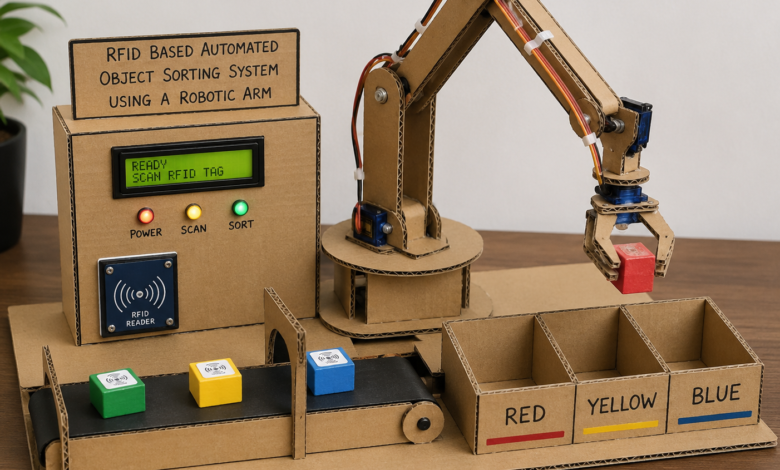
Sorting objects by hand is repetitive, slow, and error prone — exactly the kind of task automation was built for. In this project, we combine an RFID reader, a 4-DOF robotic arm, and an Arduino Uno to build a system that identifies tagged objects and automatically sorts them into one of three bins based on their RFID tag. Each object carries a unique RFID tag, and the system reads the tag, decides which bin it belongs to, and drives the robotic arm to pick it up and drop it in the correct location — no human intervention required.
This is a great intermediate level project that combines RFID communication (SPI), multi-servo motion control, and basic decision logic in one compact build.
What You Will Learn :
- How to interface an MFRC522 RFID reader with Arduino
- How to control a 4-DOF servo robotic arm (base, shoulder, elbow, gripper)
- How to map RFID tag UIDs to specific sorting actions
- How to sequence multi-servo pick-and-place motion smoothly
- How to display live status on a 16×2 I2C LCD
- How to structure a complete sorting workflow in code
Components Required :
| Component | Quantity |
|---|---|
| Arduino Uno | 1 |
| MFRC522 RFID Reader Module | 1 |
| RFID Tags/Cards (Mifare 13.56MHz) | 3+ |
| Micro Servo Motors (SG90) | 4 |
| 16×2 I2C LCD Display | 1 |
| External 5V 2A Power Supply (for servos) | 1 |
| Breadboard | 1 |
| Jumper Wires | As needed |
| 3D-printed or laser-cut robotic arm frame | 1 |
| Sorting bins (small containers) | 3 |
Libraries Required :
You will need to install the following libraries in your Arduino IDE:
- SPI.h — built into Arduino IDE, handles SPI communication with the RFID module
- MFRC522.h — install via Library Manager, handles RFID tag reading
- Servo.h — built into Arduino IDE, controls the four arm servos
- Wire.h — built into Arduino IDE, I2C communication for the LCD
- LiquidCrystal_I2C.h — install via Library Manager, drives the 16×2 I2C LCD
To install: Go to Sketch → Include Library → Manage Libraries and search for MFRC522 and LiquidCrystal I2C.
Circuit Diagram :
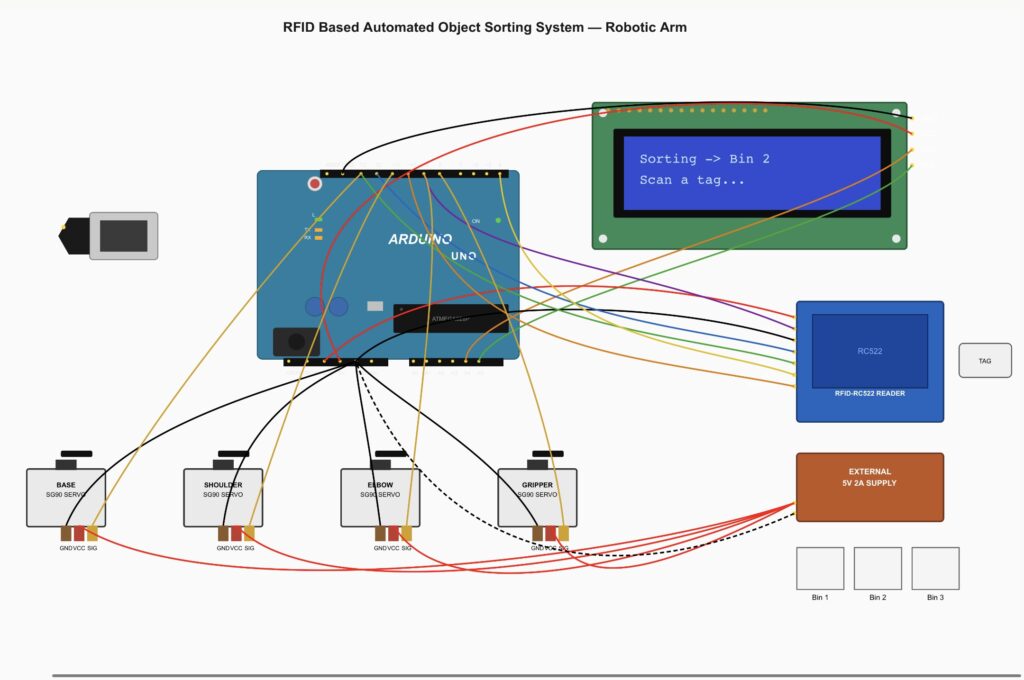
Wiring Table :
MFRC522 RFID Module → Arduino Uno
| MFRC522 Pin | Arduino Pin |
|---|---|
| SDA (SS) | D10 |
| SCK | D13 |
| MOSI | D11 |
| MISO | D12 |
| RST | D9 |
| 3.3V | 3.3V |
| GND | GND |
Servo Motors → Arduino Uno
| Servo | Arduino Pin | Power Source |
|---|---|---|
| Base rotation | D3 | External 5V |
| Shoulder | D5 | External 5V |
| Elbow | D6 | External 5V |
| Gripper | D8 | External 5V |
16×2 I2C LCD → Arduino Uno
| LCD Pin | Arduino Pin |
|---|---|
| SDA | A4 |
| SCL | A5 |
| VCC | 5V |
| GND | GND |
Important: Servos draw significant current under load. Always power them from an external 5V 2A supply, not the Arduino’s 5V pin. Connect the external supply’s GND to the Arduino’s GND for a common ground.
Note: The MFRC522 RFID module runs on 3.3V and is NOT 5V tolerant. Always connect it to the Arduino’s 3.3V pin.
How It Works :
- An object with an RFID tag is placed at the fixed pick-up position in front of the arm
- The MFRC522 module continuously scans for a tag. Once detected, it reads the tag’s unique ID (UID)
- The Arduino compares the UID against a stored list of known tags, each mapped to Bin 1, Bin 2, or Bin 3
- The LCD displays the detected tag and its assigned bin
- The robotic arm executes a pick sequence: lower to the object, close the gripper, lift, rotate the base toward the assigned bin, lower again, and release
- The arm returns to its home/resting position and waits for the next tag
- If a tag is not recognised, the LCD displays “Unknown Tag” and the arm skips the pick sequence
Circuit Simulation :
*** coming soon ***
Watch the RFID reader detect tags and the robotic arm automatically sort objects into the correct bins!
Arduino Code :
#include <SPI.h>
#include <MFRC522.h>
#include <Servo.h>
#include <Wire.h>
#include <LiquidCrystal_I2C.h>


#define SS_PIN 10
#define RST_PIN 9
MFRC522 rfid(SS_PIN, RST_PIN);


LiquidCrystal_I2C lcd(0x27, 16, 2);


Servo baseServo, shoulderServo, elbowServo, gripperServo;


const int BASE_PIN     = 3;
const int SHOULDER_PIN = 5;
const int ELBOW_PIN    = 6;
const int GRIPPER_PIN  = 8;


const int GRIPPER_OPEN   = 30;
const int GRIPPER_CLOSED = 90;


int homePos[3] = {90, 90, 90};
int pickPos[3] = {90, 60, 40};
int bin1Pos[3] = {30, 70, 50};
int bin2Pos[3] = {90, 70, 50};
int bin3Pos[3] = {150, 70, 50};


byte tag1[4] = {0xA1, 0xB2, 0xC3, 0xD4}; // Bin 1
byte tag2[4] = {0xE5, 0xF6, 0x07, 0x18}; // Bin 2
byte tag3[4] = {0x29, 0x3A, 0x4B, 0x5C}; // Bin 3


void setup() {
  Serial.begin(9600);
  SPI.begin();
  rfid.PCD_Init();


  baseServo.attach(BASE_PIN);
  shoulderServo.attach(SHOULDER_PIN);
  elbowServo.attach(ELBOW_PIN);
  gripperServo.attach(GRIPPER_PIN);


  lcd.init();
  lcd.backlight();
  lcd.setCursor(0, 0);
  lcd.print("RFID Sorter");
  lcd.setCursor(0, 1);
  lcd.print("Scan a tag...");


  moveArmTo(homePos);
  gripperServo.write(GRIPPER_OPEN);
}


void loop() {
  if (!rfid.PICC_IsNewCardPresent() || !rfid.PICC_ReadCardSerial()) {
    return;
  }


  int bin = identifyBin(rfid.uid.uidByte);


  if (bin == 0) {
    lcd.clear();
    lcd.setCursor(0, 0);
    lcd.print("Unknown Tag");
    delay(1500);
  } else {
    lcd.clear();
    lcd.setCursor(0, 0);
    lcd.print("Tag Detected");
    lcd.setCursor(0, 1);
    lcd.print("Sorting -> Bin ");
    lcd.print(bin);
    sortObject(bin);
  }


  rfid.PICC_HaltA();
  rfid.PCD_StopCrypto1();


  lcd.clear();
  lcd.setCursor(0, 0);
  lcd.print("RFID Sorter");
  lcd.setCursor(0, 1);
  lcd.print("Scan a tag...");
}


int identifyBin(byte *uid) {
  if (compareUID(uid, tag1)) return 1;
  if (compareUID(uid, tag2)) return 2;
  if (compareUID(uid, tag3)) return 3;
  return 0;
}


bool compareUID(byte *uid, byte *knownTag) {
  for (byte i = 0; i < 4; i++) {
    if (uid[i] != knownTag[i]) return false;
  }
  return true;
}


void sortObject(int bin) {
  moveArmTo(pickPos);
  gripperServo.write(GRIPPER_CLOSED);
  delay(500);


  moveArmTo(homePos);


  int *target;
  if (bin == 1) target = bin1Pos;
  else if (bin == 2) target = bin2Pos;
  else target = bin3Pos;


  moveArmTo(target);
  gripperServo.write(GRIPPER_OPEN);
  delay(500);


  moveArmTo(homePos);
}


void moveArmTo(int pos[3]) {
  int baseStart     = baseServo.read();
  int shoulderStart = shoulderServo.read();
  int elbowStart    = elbowServo.read();


  int steps = 30;
  for (int i = 0; i <= steps; i++) {
    int b = map(i, 0, steps, baseStart, pos[0]);
    int s = map(i, 0, steps, shoulderStart, pos[1]);
    int e = map(i, 0, steps, elbowStart, pos[2]);


    baseServo.write(b);
    shoulderServo.write(s);
    elbowServo.write(e);
    delay(15);
  }
}
Code Explanation :
RFID Detection: rfid.PICC_IsNewCardPresent() and rfid.PICC_ReadCardSerial() check for and read a nearby tag. Once read, rfid.uid.uidByte holds the tag’s unique 4-byte ID.
Tag Identification: identifyBin() compares the scanned UID byte by byte against three stored reference UIDs using compareUID(), returning which bin the object belongs to or 0 if unrecognised.
Position Presets: Arrays like pickPos, bin1Pos, bin2Pos, and bin3Pos store the base, shoulder, and elbow angles for each key arm position, making the motion sequence easy to read and adjust.
Smooth Motion: moveArmTo() interpolates between the current and target position over 30 steps using map(), producing smooth movement instead of abrupt jumps that can shake the object loose.
Sort Sequence: sortObject() handles the full pick-and-place: move to the pick position, close the gripper, lift to home, move to the correct bin, open the gripper to release, then return home.
LCD Feedback: The LCD updates at each stage — idle/scanning, tag detected with target bin, or unknown tag — giving a clear visual of what the system is doing.
How to Use :
- Wire the circuit exactly as shown in the wiring tables above, double checking the RFID module’s 3.3V connection
- Upload the code and open the Serial Monitor, then scan each of your tags one at a time to read their UIDs
- Replace the placeholder values in tag1, tag2, and tag3 with your actual tag UIDs
- Position the three bins at the angles matching bin1Pos, bin2Pos, and bin3Pos, adjusting these values to match your physical bin placement
- Place an object with a tag at the fixed pick-up spot and power on the system — it will scan, sort, and return home automatically!
Customisation Tips :
- Add a fourth bin: Introduce a bin4Pos array and extend identifyBin() — the base servo’s rotation range supports several bin positions
- Auto-detect objects: Swap the fixed pick-up position for an IR or ultrasonic sensor to detect when an object has been placed
- Add a buzzer: Add audible confirmation each time an object is sorted
- Log sort data: Use an SD card module to log sort counts per bin for basic sorting analytics
- Use stronger servos: Replace SG90 micro servos with higher-torque servos like MG996R if sorting heavier objects
This project ties together RFID based identification with coordinated multi-servo motion control to build a genuinely useful automation system. It is a solid foundation you can expand with more bins, smarter sensing, or even a conveyor feed for a more complete sorting station.
visit Tinkercircuits.com for more exciting Raspberry Pi Pico and Arduino projects!
Happy Tinkering! The Tinker Circuits Team