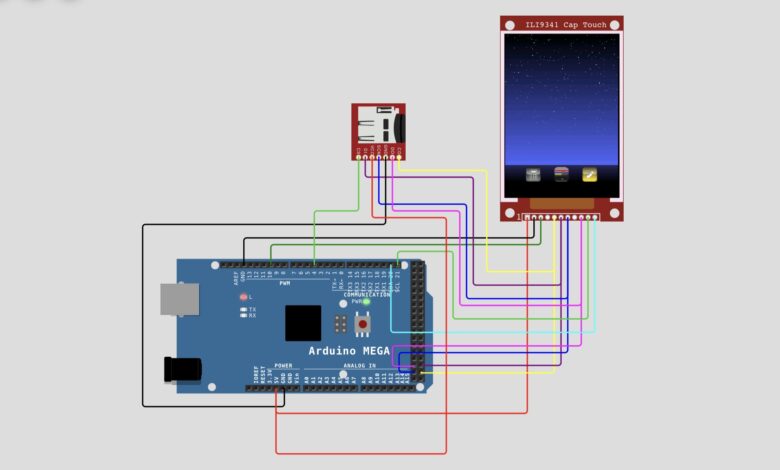
Most Arduino projects are designed for a single task, but this project explores something more ambitious — building a mini touchscreen operating system capable of launching multiple applications through a graphical interface.
Built using an Arduino Mega 2560, ILI9341 Capacitive Touch Display, and microSD card, the system boots into a custom launcher where users can interact with multiple applications using touch controls.
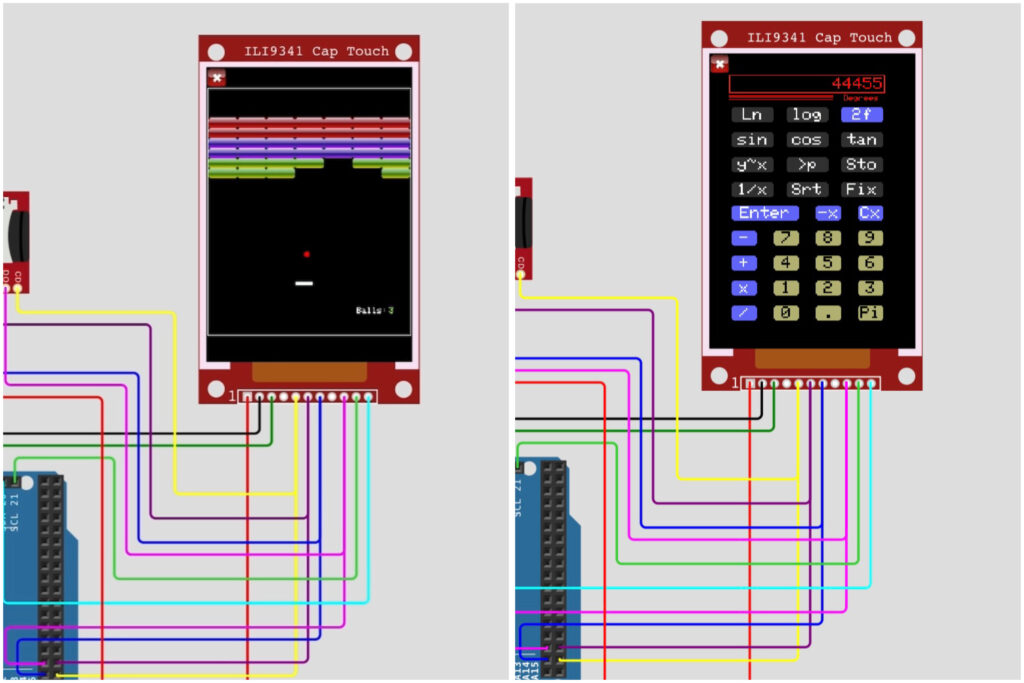
The current version includes :
- RPN Calculator
- Breakout Game
- Icon Editor
Instead of relying on one large sketch, the system uses the lilOS framework, creating a lightweight embedded operating environment with modular applications and SD-card-based resources.
Component List :
| Component | Purpose |
| Arduino Mega 2560 | Main controller |
| ILI9341 Capacitive Touch Display | Graphics and touch input |
| MicroSD Card | Resource storage |
| Jumper Wires | Connections |
| 5V Supply | Power |
The touchscreen module handles both display and touch interaction, while the SD card stores graphics and application assets.
Circuit Diagram : :
How the System Works :
The system is built on lilOS, a lightweight GUI and panel framework.
Software architecture :
Arduino Hardware
↓
Display + Touch Libraries
↓
lilOS Framework
↓
ourOSObj
↓
Applications
The OS dynamically creates applications rather than loading everything at once, improving organisation and memory efficiency.
Circuit Simulation :
This project demonstrates how Arduino can move beyond traditional single purpose sketches and support a lightweight graphical operating environment.
Libraries Required :
Install these libraries before compiling.
Standard Libraries :
- Adafruit GFX Library
- Adafruit FT6206 Library
- Adafruit ILI9341
- SD
- Adafruit SSD1351 Library
- Adafruit SSD1331 OLED Driver Library
lilOS Libraries :
- LC_Adafruit_1947
- LC_baseTools
- LC_GUIbase
- LC_GUIItems
- LC_GUITextTools
- LC_keyboard
- LC_RPNCalculator
- LC_scrollingList
- LCP_breakout
- LCP_rpnCalc
- LC_lilOS
- LC_Adafruit_1431
- LC_Adafruit_684
- LC_offscreen
- LC_modalAlerts
- LC_piezoTunes
- LC_debug
- LC_stampObj
- LC_docTools
- LCP_iconEdit
- LC_SPI
Complete Source Code :
1. Breakout & Icon Editor.ino
#include <SD.h>
#include <adafruit_1947_Obj.h>
#include <screen.h>
#include "ourOSObj.h"
#include <blinker.h>


// Create objects
ourOSObj systemOS;
blinker statusBlink;


// Function to stop program if hardware fails
void haltSystem(const char* errorMsg) {
    Serial.println(errorMsg);
    Serial.flush();
    while (1);
}


void setup() {


    // Start serial monitor
    Serial.begin(57600);


    // Initialize display
    bool screenReady = initScreen(
        ADAFRUIT_1947,
        ADA_1947_SHIELD_CS,
        PORTRAIT
    );


    if (!screenReady) {
        haltSystem("NO SCREEN!");
    }


    // Initialize SD card
    bool sdReady = SD.begin(ADA_1947_SHIELD_SDCS);


    if (!sdReady) {
        haltSystem("NO SD CARD!");
    }


    // Start event manager and OS
    ourEventMgr.begin();
    systemOS.begin();


    // Optional panel selection
    // nextPanel = breakoutApp;


    // Enable blinker
    statusBlink.setOnOff(true);
}


void loop() {


    // Background tasks
    idle();


    // Run operating system loop
    systemOS.loop();
}
2. ourOSObj.cpp
#include "ourOSObj.h"
#include <rpnCalc.h>
#include <breakout.h>
#include <iconEdit.h>
//#include <starTrek.h>
//#include "testAppPanel.h"
#include "homeScr.h"


#define SCREEN_PIN 25      // The analog pin chosen for the screen backlight.


char systemFolder[] = "/system/";
char panelFolder[]  = "/system/appFiles/";


// ************************************
// ************* ourOSObj *************
// ************************************


ourOSObj::ourOSObj(void)
  : liliOS() { }


ourOSObj::~ourOSObj(void) { }


// The hardware is online, do hookups.
int ourOSObj::begin(void) {


  return liliOS::begin();
}


//void backlightOn(void) { ourOSPtr->setBrightness(255); }


// We need to write our own panel creation method.
panel* ourOSObj::createPanel(int panelID) {


  panel* result;


  //setBrightness(0);


  switch (panelID) {


    case homeApp      : result = new homeScr();                    break;
    case calcApp      : result = new rpnCalc(this,panelID);        break;
    case iconEditApp  : result = new iconEdit(this,panelID);       break;
    case breakoutApp  : result = new breakout(this,panelID);       break;
    //case starTrekApp : result = new starTrekPanel(this,panelID); break;
    //case testApp     : result = new testAppPanel(this,panelID);  break;
    default           : result = NULL;
  }


  return(result);
}


// And how to control the screen brightness.
void ourOSObj::setBrightness(byte brightness) {
  analogWrite(SCREEN_PIN, brightness);
}


char* ourOSObj::getSystemFolder(void) {
  return systemFolder;
}


// Hand this an appID and get back a pointer to the path of its data folder.
char* ourOSObj::getPanelFolder(int panelID) {


  strcpy(pathBuff, panelFolder);


  switch (panelID) {


    case homeApp :
      return NULL;
    break;


    case calcApp :
      strcat(pathBuff, "rpnCalc/");
      return pathBuff;
    break;


    case iconEditApp :
      strcat(pathBuff, "iconEdit/");
      return pathBuff;
    break;


    case breakoutApp :
      strcat(pathBuff, "breakout/");
      return pathBuff;
    break;


    //case starTrekApp :
    //  strcat(pathBuff, "starTrek/");
    //  return pathBuff;
    //break;


    //case testApp :
    //  strcpy(pathBuff,getSystemFolder());
    //  strcat(pathBuff,"icons/standard/");
    //  return pathBuff;
    //break;


    default :
      return NULL;
  }
}
3. ourOSObj.h
#ifndef ourOSObj_h
#define ourOSObj_h


#include <lilOS.h>


enum apps {
    homeApp = HOME_PANEL_ID,
    calcApp,
    breakoutApp,
    /*testApp*/
    iconEditApp/*, starTrekApp*/
};


class ourOSObj : public lilOS {


public:
    ourOSObj(void);
    virtual ~ourOSObj(void);


    virtual int begin(void);                          // The hardware is online, do hookups.
    virtual panel* createPanel(int panelID);          // We need to write our own panel creation method.
    //void backlightOn(void);
    virtual void beep(void);                          // Only WE know how to make it beep.
    virtual int getTonePin(void);
    virtual void setBrightness(byte brightness);      // 0 for full bright 255 for off.
    virtual char* getSystemFolder(void);
    virtual char* getPanelFolder(int panelID);
};


extern bmpMask iconMask;


#endif
4. homeScr.h
#ifndef homePanel_h
#define homePanel_h


#include "ourOSObj.h"
#include <bmpObj.h>


// ************************************************************
//                        homeScr
// ************************************************************


class homeScr : public panel {


public:
    homeScr(void);
    virtual ~homeScr(void);


    char* iconPath(int appID, char* iconName);
    virtual void setup(void);
    virtual void loop(void);
    void doStarField(void);
    virtual void drawSelf(void);


    char pathBuff[80];
};


#endif
5. homeScr.cpp
#include "homeScr.h"
#include <lilOS.h>


#define BAR_Y 286


struct spacer {
    float startPos;
    float stepSize;
};


spacer calcSpacer(float numItems, float itemLength, float areaLength) {


    spacer aSpacer;


    numItems++;
    aSpacer.stepSize = areaLength / numItems;
    aSpacer.startPos = aSpacer.stepSize - itemLength / 2;


    return aSpacer;
}


homeScr::homeScr(void)
    : panel(homeApp, noMenuBar) { }


homeScr::~homeScr(void) { }


char* homeScr::iconPath(int appID, char* iconName) {


    strcpy(pathBuff, ourOSPtr->getPanelFolder(appID));
    strcat(pathBuff, iconName);


    return pathBuff;
}


void homeScr::setup(void) {


    int traceY;
    int traceX;
    int stepX;


    appIcon* theAppIcon;
    spacer barSpacer;


    barSpacer = calcSpacer(3, 32, 240);
    traceX = barSpacer.startPos;
    stepX = barSpacer.stepSize;
    traceY = BAR_Y;


    theAppIcon = new appIcon(traceX, traceY, calcApp,
                             iconPath(calcApp, "calc32.bmp"));
    theAppIcon->setMask(&(ourOSPtr->icon32Mask));
    addObj(theAppIcon);


    traceX = traceX + stepX;
    theAppIcon = new appIcon(traceX, traceY, breakoutApp,
                             iconPath(breakoutApp, "breakout.bmp"));
    theAppIcon->setMask(&(ourOSPtr->icon32Mask));
    addObj(theAppIcon);


    traceX = traceX + stepX;
    theAppIcon = new appIcon(traceX, traceY, iconEditApp,
                             iconPath(iconEditApp, "iconEdit.bmp"));
    theAppIcon->setMask(&(ourOSPtr->icon32Mask));
    addObj(theAppIcon);


    // traceX = traceX + stepX;
    // theAppIcon = new appIcon(traceX, traceY, starTrekApp,
    //                          iconPath(starTrekApp, "sTrek32.bmp"));
    // theAppIcon->setMask(&(ourOSPtr->icon32Mask));
    // addObj(theAppIcon);


    // traceX = traceX + stepX;
    // theAppIcon = new appIcon(traceX, traceY, testApp,
    //                          iconPath(testApp, "app32.bmp"));
    // theAppIcon->setMask(&(ourOSPtr->icon32Mask));
    // addObj(theAppIcon);
}


void homeScr::loop(void) { }


void homeScr::doStarField(void) {


    int randNum;
    colorMapper ourCMapper;
    colorObj aColor;
    mapper yMapper(0, 282, 0, 100);
    float yPercent;


    aColor.setColor(LC_LIGHT_BLUE);
    aColor.blend(&blue, 50);


    ourCMapper.setColors(&white, &aColor);


    randomSeed(analogRead(A10));


    for (int sy = 0; sy < 282; sy++) {
        for (int sx = 0; sx < 240; sx++) {


            randNum = random(0, 400);


            if (randNum == 300) {
                yPercent = yMapper.map(sy);
                aColor = ourCMapper.map(yPercent);
                screen->drawPixel(sx, sy, &aColor);
            }


            if (sy < 141 && randNum == 250) {
                yPercent = yMapper.map(sy);
                aColor = ourCMapper.map(yPercent);
                screen->drawPixel(sx, sy, &aColor);
            }
        }
    }
}


void homeScr::drawSelf(void) {


    // bmpObj theScreenImage(0,0,240,282,"/system/images/lake.bmp");


    colorObj lineColor;
    colorObj scrFadeColor;


    lineColor.setColor(LC_CHARCOAL);
    lineColor.blend(&blue, 20);


    screen->fillRectGradient(0, 282, 240, 38, &lineColor, &black);


    // theScreenImage.draw();


    scrFadeColor.setColor(LC_LIGHT_BLUE);
    scrFadeColor.blend(&blue, 50);


    screen->fillRectGradient(0, 0, 240, 282, &black, &scrFadeColor);


    doStarField();
}
SD Card Folder Structure :
The project relies heavily on SD resources.
Required structure :
/System
├── icons
├── images
├── breakout
├── iconEdit
└── rpnCalc
└── appFiles
Example resources :
/System/appFiles/rpnCalc/calc32.bmp
/System/appFiles/breakout/breakout.bmp
/System/appFiles/iconEdit/iconEdit.bmp
These files are loaded dynamically during runtime.
Using:
- Arduino Mega
- ILI9341 capacitive touchscreen
- SD-card resource loading
- lilOS framework
- Modular applications
the result becomes a compact touchscreen operating system capable of launching multiple apps from a custom graphical interface.
Its modular architecture also leaves room for future applications and feature expansion.
visit Tinkercircuits.com for more exciting Arduino projects!
Happy Tinkering! — The Tinker Circuits Team